
使用DBT在Lakehouse进行增量开发
注意事项
- 请使用 dbt-clickzetta 1.7.8 及以上版本(需要 Python 3.10+,推荐 3.12;dbt-core 1.8+)。
准备工作
- 安装 dbt-clickzetta(已自动包含 dbt-core):
pip install "dbt-clickzetta>=1.7.8"
- 初始化 dbt 项目
$ dbt init cz_dbt_project Which database would you like to use? [1] clickzetta Enter a number: 1 service (cn-shanghai-alicloud.api.clickzetta.com): cn-shanghai-alicloud.api.clickzetta.com instance (your_instance): <your_instance> workspace (your_workspace): <your_workspace> vcluster (DEFAULT_AP): DEFAULT username (your_username): <user_name> schema (default schema): dbt_dev password (password): <your_passwd> Profile cz_dbt_project written to /Users/username/.dbt/profiles.yml Your new dbt project "cz_dbt_project" was created! $ cd cz_dbt_project
- 配置 ClickZetta dbt 项目 profiles
打开并编辑
~/.dbt/profiles.ymlservicecz_dbt_project: target: dev outputs: prod: type: clickzetta service: cn-shanghai-alicloud.api.clickzetta.com instance: <your_instance_name> username: <user_name> password: <passwd> workspace: <your_workspace_name> schema: dbt_prod vcluster: DEFAULT dev: type: clickzetta service: cn-shanghai-alicloud.api.clickzetta.com instance: <your_instance_name> username: <user_name> password: <passwd> workspace: <your_workspace_name> schema: dbt_dev vcluster: DEFAULT
- 验证配置
$ dbt debug 02:22:03 Connection test: [OK connection ok] 02:22:03 All checks passed!
- 测试运行
通过
dbt run- model.cz_dbt_project.my_first_dbt_model
- model.cz_dbt_project.my_second_dbt_model
$ dbt run
查看执行日志是否成功,并检查目标环境下(例如
dbt_devmy_first_dbt_modelmy_second_dbt_model创建基于Table Stream的增量加工任务
场景说明
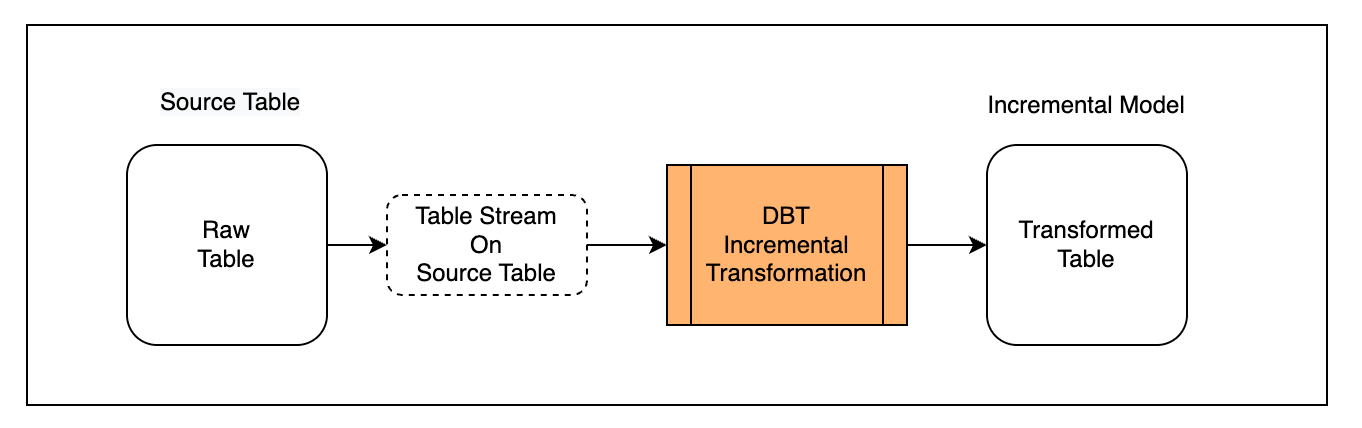
首先,将外部写入的表定义为 Source Table,并为 Source Table 创建 Table Stream 对象以获取增量变化数据;
其次,在 DBT 中创建使用 Table Stream 的增量模型("materialized='incremental'");
最后,多次运行模型观察增量处理效果。
准备Source表
创建一张原始表,通过数据集成工具持续导入数据:
CREATE TABLE public.ecommerce_events_multicategorystore_live( `event_time` timestamp, `event_type` string, `product_id` string, `category_id` string, `category_code` string, `brand` string, `price` decimal(10,2), `user_id` string, `user_session` string) TBLPROPERTIES( 'change_tracking'='true');
注意:增量数据捕获的变更跟踪现由系统自动处理,无需手动设置
'change_tracking' = 'true'为原始表创建一个Table Stream对象,跟踪原始表的变化记录:
-- Create stream on source table CREATE TABLE STREAM public.stream_ecommerce_events on table ecommerce_events_multicategorystore_live with PROPERTIES ('TABLE_STREAM_MODE' = 'APPEND_ONLY')
同时在
cz_dbt_projectsources.yml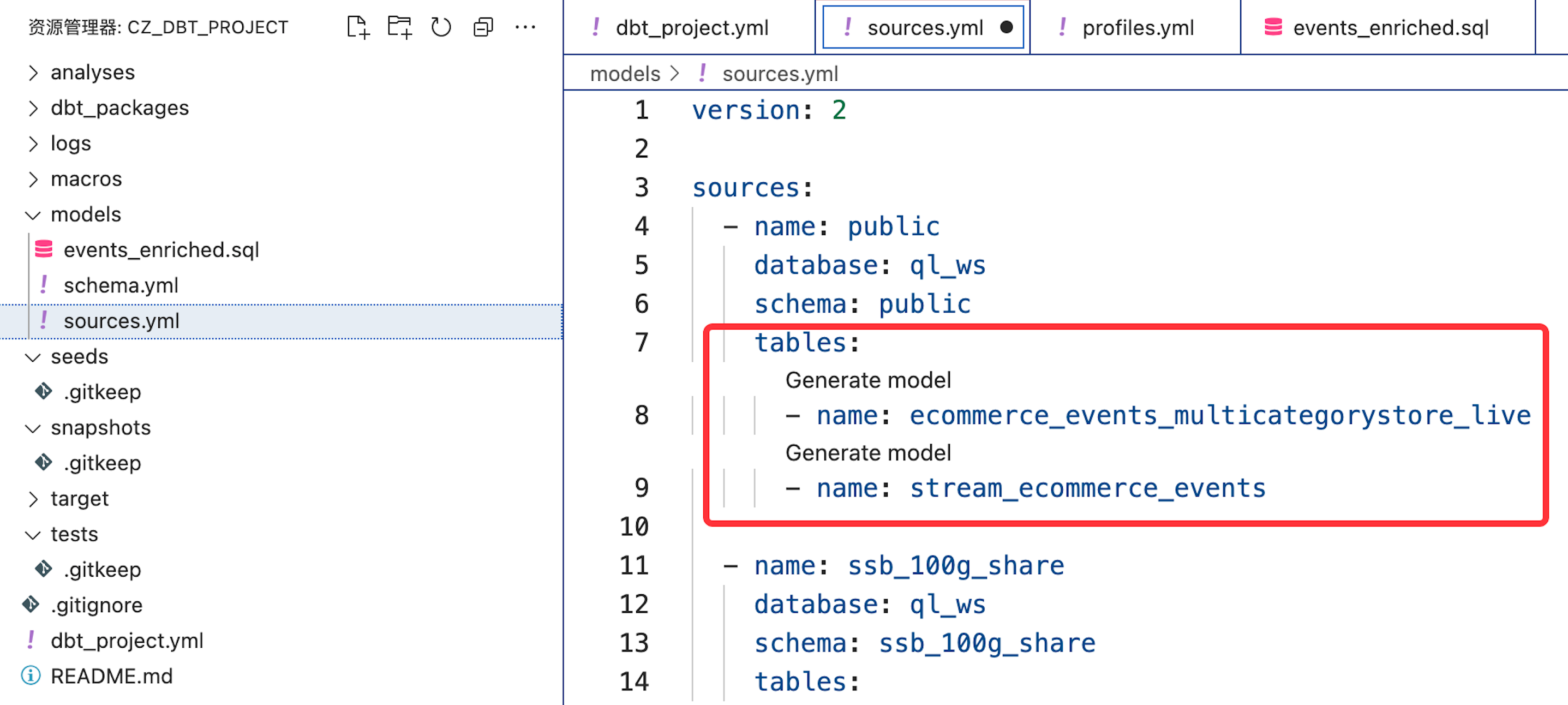
开发模型
创建名称为 events_enriched.sql 的 dbt 模型,通过配置方式声明为增量模型:
{{ config( materialized='incremental' ) }} SELECT event_time, CAST(SUBSTRING(event_time,0,19) AS TIMESTAMP) AS event_timestamp, SUBSTRING(event_time,12,2) AS event_hour, SUBSTRING(event_time,15,2) AS event_minute, SUBSTRING(event_time,18,2) AS event_second, event_type, product_id, category_id, category_code, brand, CAST(price AS DECIMAL(10,2)) AS price, user_id, user_session, CAST(SUBSTRING(event_time,0,19)AS date) AS event_date, CURRENT_TIMESTAMP() as loaded_at FROM {% if is_incremental() %} {{source('quning', 'stream_ecommerce_events')}} {% else %} {{source('quning', 'ecommerce_events_multicategorystore_live')}} {% endif %}
注意:
- 当通过
dbt builddbt build命令构建模型时,is_incremental()is_incremental()条件判断为 False,将使用原始表ecommerce_events_multicategorystore_liveecommerce_events_multicategorystore_live的全量数据进行模型构建; - 当通过
dbt rundbt run执行模型时,is_incremental()is_incremental()将识别为 True,将进行增量加工;
如果你希望在构建和后续运行时都仅使用 Table Stream 的增量数据(Table Stream 默认仅提供其创建之后的变化数据)进行模型构建,可对模型进行如下定义:
{{ config( materialized='incremental' ) }} SELECT `event_time` , `event_type` , `product_id` , `category_id` , `category_code` , `brand` , `price` , `user_id` , `user_session` , CURRENT_TIMESTAMP() as load_time FROM {{source('public', 'stream_ecommerce_events')}}
构建模型
通过
dbt builddbt build --model events_enriched
通过观察日志,模型构建时通过以下语句创建模型,并初始对原始表全量数据进行加工转换:
/* {"app": "dbt", "dbt_version": "1.8.x", "profile_name": "cz_dbt_project", "target_name": "dev", "node_id": "model.cz_dbt_project.events_enriched"} */ create table dbt_dev.events_enriched as SELECT event_time, CAST(SUBSTRING(event_time,0,19) AS TIMESTAMP) AS event_timestamp, SUBSTRING(event_time,12,2) AS event_hour, SUBSTRING(event_time,15,2) AS event_minute, SUBSTRING(event_time,18,2) AS event_second, event_type, product_id, category_id, category_code, brand, CAST(price AS DECIMAL(10,2)) AS price, user_id, user_session, CAST(SUBSTRING(event_time,0,19)AS date) AS event_date, CURRENT_TIMESTAMP() as loaded_at FROM public.ecommerce_events_multicategorystore_live;
在 Lakehouse 的目标环境下检查数据对象:
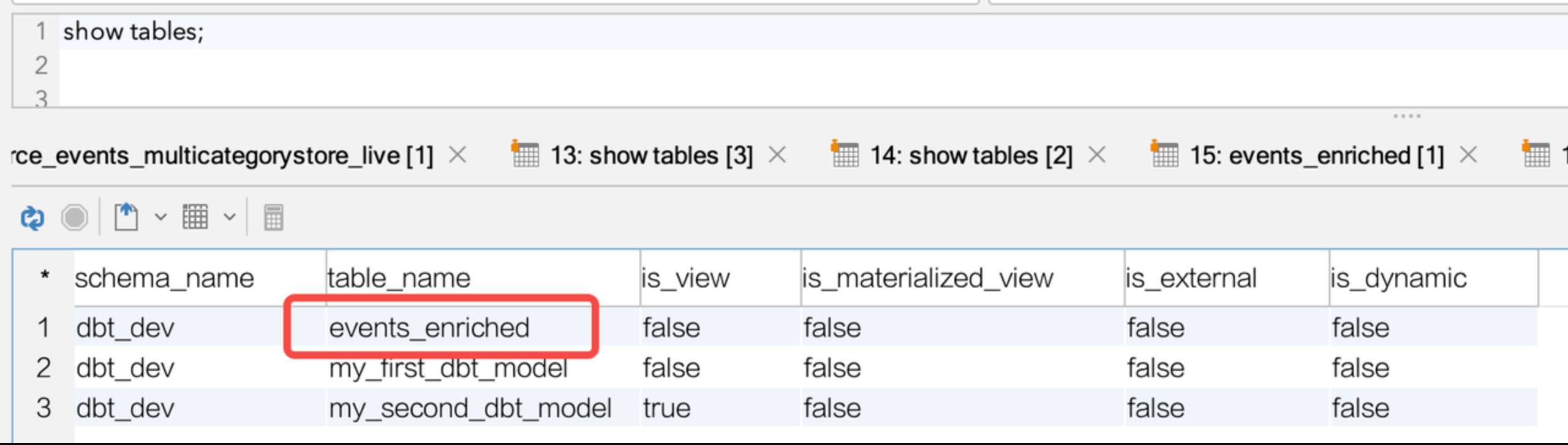
select count(*) from events_enriched ; `count`(*) ---------- 3700
数据对象以及初始数据成功创建并写入。
运行模型
通过
dbt rundbt run --model events_enriched
根据 dbt 增量模型逻辑,dbt 将在目标环境创建一个临时视图来表示增量数据。
/* {"app": "dbt", "dbt_version": "1.8.x", "profile_name": "cz_dbt_project", "target_name": "dev", "node_id": "model.cz_dbt_project.events_enriched"} */ create or replace view dbt_dev.events_enriched__dbt_tmp as SELECT event_time, CAST(SUBSTRING(event_time,0,19) AS TIMESTAMP) AS event_timestamp, SUBSTRING(event_time,12,2) AS event_hour, SUBSTRING(event_time,15,2) AS event_minute, SUBSTRING(event_time,18,2) AS event_second, event_type, product_id, category_id, category_code, brand, CAST(price AS DECIMAL(10,2)) AS price, user_id, user_session, CAST(SUBSTRING(event_time,0,19)AS date) AS event_date, CURRENT_TIMESTAMP() as loaded_at FROM public.stream_ecommerce_events;
同时,dbt 根据模型中
materialized='incremental'MERGE INTO/* {"app": "dbt", "dbt_version": "1.8.x", "profile_name": "cz_dbt_project", "target_name": "dev", "node_id": "model.cz_dbt_project.events_enriched"} */ -- back compat for old kwarg name merge into dbt_dev.events_enriched as DBT_INTERNAL_DEST using dbt_dev.events_enriched__dbt_tmp as DBT_INTERNAL_SOURCE on FALSE when not matched then insert (`event_time`,`event_timestamp`,`event_hour`,`event_minute`,`event_second`,`event_type`,`product_id`,`category_id`,`category_code`,`brand`,`price`,`user_id`,`user_session`,`event_date`,`loaded_at`) values ( DBT_INTERNAL_SOURCE.`event_time`,DBT_INTERNAL_SOURCE.`event_timestamp`,DBT_INTERNAL_SOURCE.`event_hour`,DBT_INTERNAL_SOURCE.`event_minute`,DBT_INTERNAL_SOURCE.`event_second`,DBT_INTERNAL_SOURCE.`event_type`,DBT_INTERNAL_SOURCE.`product_id`,DBT_INTERNAL_SOURCE.`category_id`,DBT_INTERNAL_SOURCE.`category_code`,DBT_INTERNAL_SOURCE.`brand`,DBT_INTERNAL_SOURCE.`price`,DBT_INTERNAL_SOURCE.`user_id`,DBT_INTERNAL_SOURCE.`user_session`,DBT_INTERNAL_SOURCE.`event_date`,DBT_INTERNAL_SOURCE.`loaded_at` );
每次执行 dbt run,都会从 table stream 中读取数据并 Merge into 目标模型。写入成功后,Table Stream 的变化记录位置会自动前进,下次 dbt run 时将自动处理最新的增量数据。
创建基于动态表的加工任务
场景说明
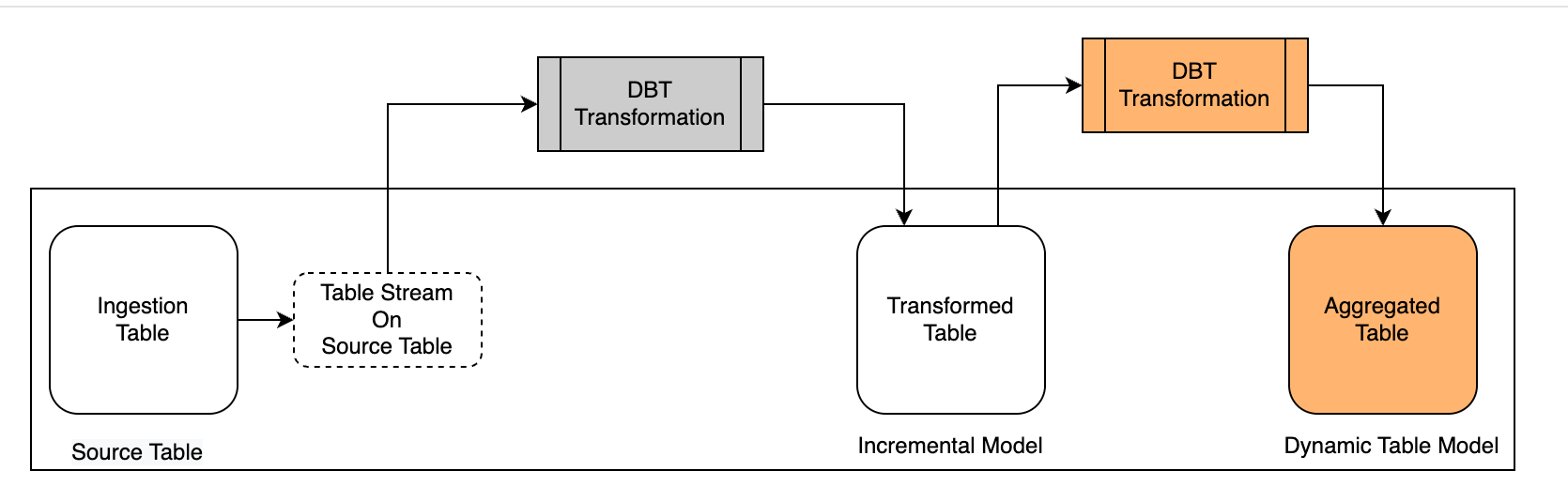
结合前面的场景设计,这里继续使用dbt-clickzetta的Dynamic Table模型对已经完成转换的表进行聚合加工。
首先,在 dbt 中创建使用 Dynamic Table 的模型(
materialized='dynamic_table'其次,在目标环境观察动态表模型的构建和刷新结果。
开发模型
创建名称为 product_grossing.sql 的 dynamic table 模型。
- 代码定义
{{ config( materialized = 'dynamic_table', refresh_vc = 'default', refresh_interval = '5 MINUTE' ) }} select event_date, product_id, sum(price) sum_price from {{ ref("events_enriched")}} group by event_date,product_id
构建模型
通过
dbt builddbt build --model product_grossing
通过观察日志,模型构建时通过以下语句创建模型,并初始对原始表全量数据进行加工转换:
/* {"app": "dbt", "dbt_version": "1.8.x", "profile_name": "cz_dbt_project", "target_name": "dev", "node_id": "model.cz_dbt_project.product_grossing"} */ create or replace dynamic table dbt_dev.product_grossing refresh interval 5 minute vcluster default as select event_date, product_id, sum(price) sum_price from dbt_dev.events_enriched group by event_date,product_id;
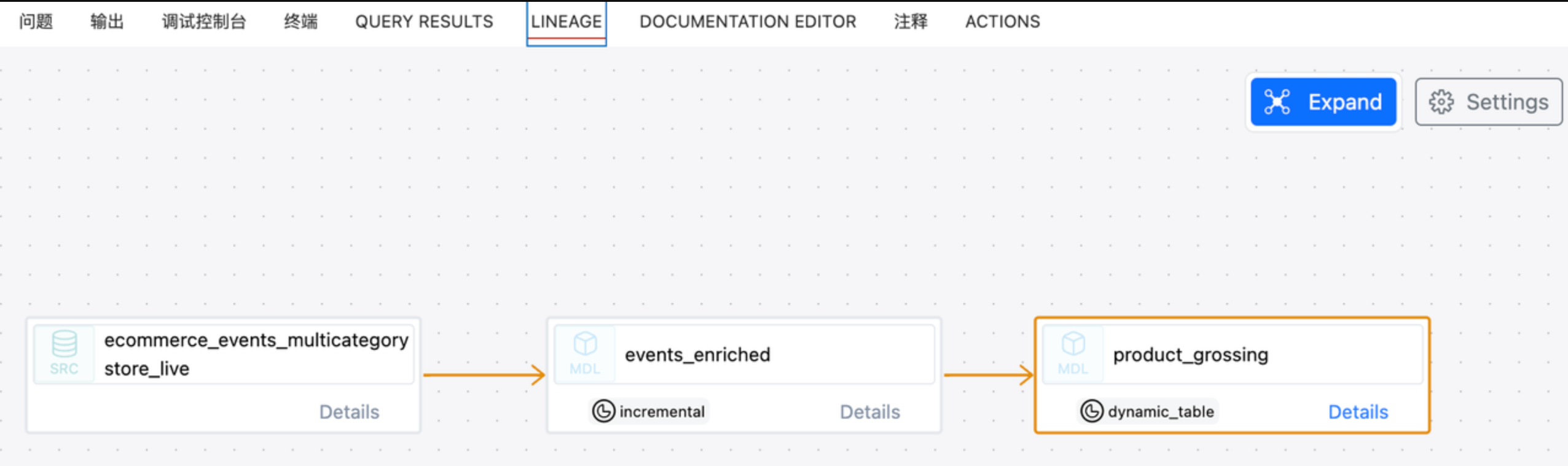
通过 dbt 可查看模型血缘关系:
在 Lakehouse 的目标环境下检查数据对象:
show tables; schema_name table_name is_view is_materialized_view is_external is_dynamic ----------- ------------------------ ------- -------------------- ----------- ---------- dbt_dev events_enriched false false false false dbt_dev events_enriched__dbt_tmp true false false false dbt_dev my_first_dbt_model false false false false dbt_dev my_second_dbt_model true false false false
同时通过
DESCdesc extended product_grossing; column_name data_type ---------------------------- ------------------------------------------------------------------------------------------------------------------------------------------------------------------------------------------------------------------------------------------------------------- event_date date product_id string sum_price decimal(20,2)
detailed table information:
schema dbt_dev name product_grossing creator xxx created_time 2024-06-22 21:03:40.467 last_modified_time 2024-06-22 21:08:41.184 comment properties (("refresh_vc","default")) type DYNAMIC TABLE view_text SELECT events_enriched.event_date, events_enriched.product_id, `sum`(events_enriched.price) AS sum_price FROM ql_ws.dbt_dev.events_enriched GROUP BY events_enriched.event_date, events_enriched.product_id; view_original_text select event_date, product_id, sum(price) sum_price from dbt_dev.events_enriched group by event_date,product_id; source_tables [86:ql_ws.dbt_dev.events_enriched=8278006558627319396] refresh_type on schedule refresh_start_time 2024-06-22 21:03:40.418 refresh_interval_second 300 unique_key_is_valid true unique_key_version_info unique_key_version: 1, explode_sort_key_version: 1, digest: H4sIAAAAAAAAA3NMT9cx0nEP8g8NUHCKVDBScPb3CfX1C+ZSCE5OzANKBfmHx3u7Riq4Bfn7KqSWpeaVFMen5hVlJmekpnABAIf7bMY+AAAA, unique key infos:[sourceTable: 86:ql_ws.dbt_dev.events_enriched, uniqueKeyType: 1,] format PARQUET format_options (("cz.storage.parquet.block.size","134217728"),("cz.storage.parquet.dictionary.page.size","2097152"),("cz.storage.parquet.page.size","1048576")) statistics 99 rows 4468 bytes
运行模型
Dynamic Table 类型的 dbt 模型,通过构建时设置的周期刷新参数,由 Lakehouse 自动调度,无需通过
dbt run在目标环境完成模型构建后,你可以在 Lakehouse 平台通过以下 SQL 命令查看动态表的刷新状态:
show dynamic table refresh history where name ='product_grossing' workspace_name schema_name name virtual_cluster start_time end_time duration state refresh_trigger suspended_reason refresh_mode error_message source_tables stats completion_target job_id -------------- ----------- ---------------- --------------- ------------------- ------------------- -------------------- ------- ---------------- ---------------- ------------ ------------- ------------------------------------------------------------------------- ----------------------------------------- ----------------- ------------------------ ql_ws dbt_dev product_grossing DEFAULT 2024-06-22 21:08:40 2024-06-22 21:08:41 0 00:00:00.566000000 SUCCEED SYSTEM_SCHEDULED (null) INCREMENTAL (null) [{"schema":"dbt_dev","table_name":"events_enriched","workspace":"ql_ws"}] {"rows_deleted":"0","rows_inserted":"99"} (null) 202406222108406319689694