(SaaS)² :云器Lakehouse+Zilliz,Make Data Ready for BI and AI
方案简介
-
(SaaS)²:云器 Lakehouse 和 Zilliz 都提供了基于主流云服务的 SaaS 模式服务。通过 SaaS 服务的组合,最大程度从全托管和按量付费的 SaaS 模式中获益。
-
Make Data Ready for BI and AI:云器 Lakehouse 的数据仓库专注于面向 BI 应用提供标量数据的存储、处理和分析;Zilliz 向量数据库专注于面向 AI 的增强数据分析。通过云器 Lakehouse 和 Zilliz 向量数据库的集成,提供完整的生产级别的 BI+AI 解决方案,解决 BI、AI 不对称的问题:
- BI 数据和 AI 数据新鲜度不对称:Zilliz Vector Data Pipeline 提供批量数据 Embedding 服务,与非批量相比,Embedding 时间缩短 10 倍以上,大幅提升 AI 数据的新鲜度。
- BI 数据和 AI 数据规模不对称:Zilliz 在百亿级向量数据级别时仍能提供稳定的快速响应和并发性,向量数据不再是一个补充性的“小众”数据,实现 BI 数据和 AI 数据在规模上的并驾齐驱。
-
业务升级:以最简单的方案将传统的数据分析升级到增强分析,实现 BI+AI 的融合。
方案组成
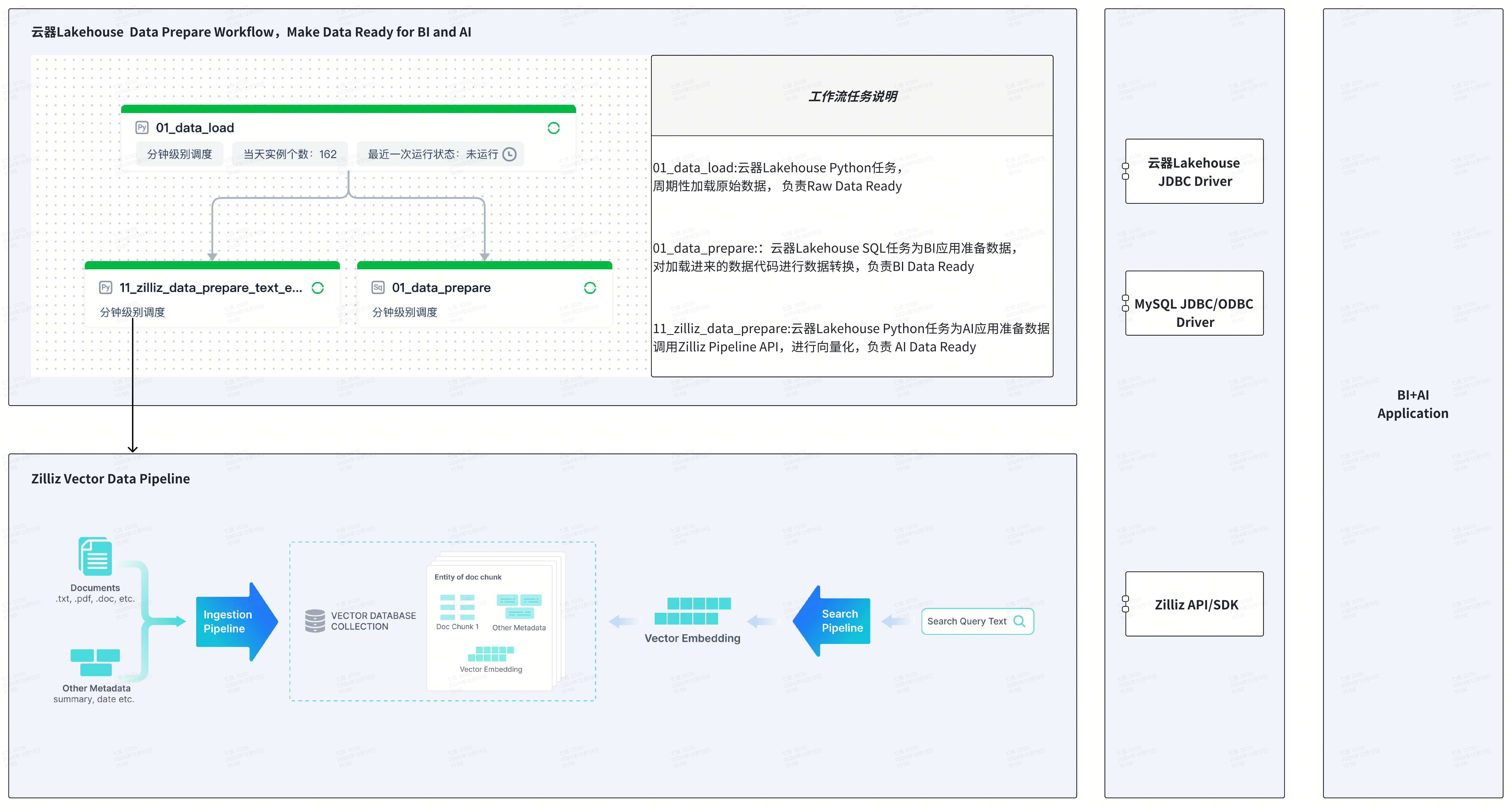
- 云器 Lakehouse 平台:提供数据湖和数据仓库的管理,包括数据管理、数据集成、任务开发、任务执行、工作流(workflow)编排、任务监控与运维等。
- 云器 Zettapark:通过 Python + DataFrame 的编程方式,实现 CSV 文件的加载。
- Zilliz 向量数据库:性能出色、性价比高的向量数据库。
- Zilliz Data Pipeline:对文本、图片、文件等数据进行向量化存储和检索,支持中英文 Embedding 模型、Rerank 模型,提供极致简化和开发者友好的向量处理方式。
应用场景示例:通过语义检索增强文本搜索
- 标量检索:云器 Lakehouse 提供基于文本的 LIKE 模糊匹配、基于文本倒排索引的关键字搜索。
- 向量检索:Zilliz 提供基于向量数据的语义检索和 Rerank 模型的结果精排。
将标量检索和向量检索结合,提高检索的性能与准确性,适用于产品搜索、产品推荐等场景。
任务一:加载原始数据到云器Lakehouse
云器 Lakehouse 提供多种加载 CSV 数据的方式,包括 Web 方式的离线数据同步、通过数据湖加载 CSV 等。本文采用云器 Zettapark 方式实现数据加载,Python 代码运行在云器 Lakehouse 的 Python 任务节点中。
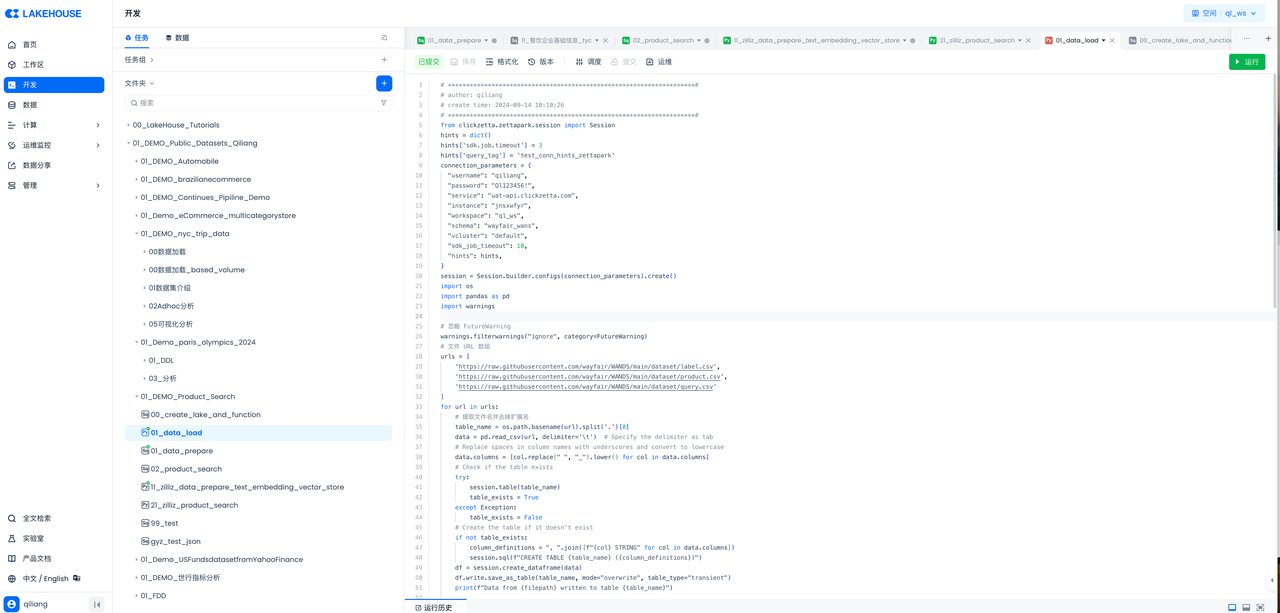
代码如下:
# ********************************************************************#
# author: qiliang
# create time: 2024-09-14 10:10:26
# ********************************************************************#
from clickzetta.zettapark.session import Session
hints = dict()
hints['sdk.job.timeout'] = 3
hints['query_tag'] = 'test_conn_hints_zettapark'
connection_parameters = {
"username": "qiliang",
"password": "",
"service": "<region\_id>.api.clickzetta.com",
"instance": "",
"workspace": "ql_ws",
"schema": "wayfair_wans",
"vcluster": "default",
"sdk_job_timeout": 10,
"hints": hints,
}
session = Session.builder.configs(connection_parameters).create()
import os
import pandas as pd
import warnings
# 忽略 FutureWarning
warnings.filterwarnings("ignore", category=FutureWarning)
# 文件 URL 数组
urls = [
'https://raw.githubusercontent.com/wayfair/WANDS/main/dataset/label.csv',
'https://raw.githubusercontent.com/wayfair/WANDS/main/dataset/product.csv',
'https://raw.githubusercontent.com/wayfair/WANDS/main/dataset/query.csv'
]
for url in urls:
# 提取文件名并去掉扩展名
table_name = os.path.basename(url).split('.')[0]
data = pd.read_csv(url, delimiter='\t') # Specify the delimiter as tab
# Replace spaces in column names with underscores and convert to lowercase
data.columns = [col.replace(" ", "_").lower() for col in data.columns]
# Check if the table exists
try:
session.table(table_name)
table_exists = True
except Exception:
table_exists = False
# Create the table if it doesn't exist
if not table_exists:
column_definitions = ", ".join([f"{col} STRING" for col in data.columns])
session.sql(f"CREATE TABLE {table_name} ({column_definitions})")
df = session.create_dataframe(data)
df.write.save_as_table(table_name, mode="overwrite", table_type="transient")
print(f"Data from {filepath} written to table {table_name}")
# Drop tables starting with 'zettapark_temp_table_'
try:
tables = session.sql("SHOW TABLES LIKE 'zettapark_temp_table_%'").collect()
for table in tables:
table_name = table['table_name']
session.sql(f"DROP TABLE IF EXISTS {table_name}").collect()
print(f"temp Table {table_name} dropped")
except Exception as e:
print(f"Error dropping temp tables: {e}")
# Close the session
session.close()
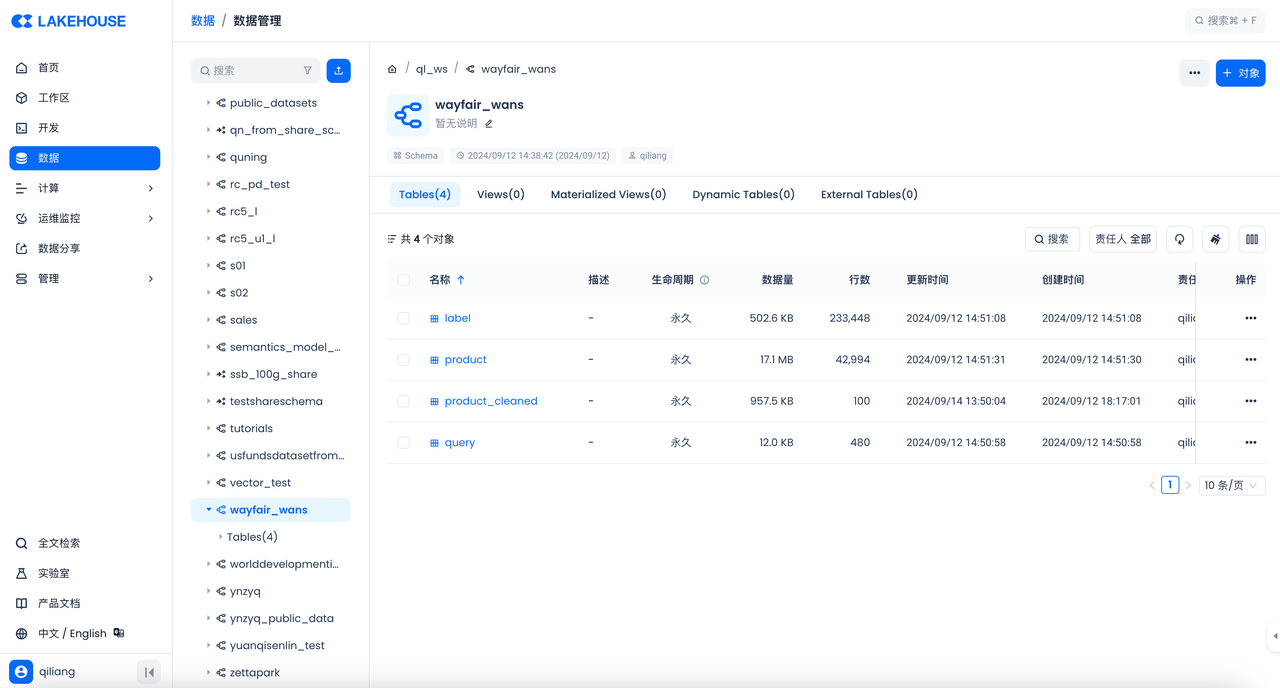
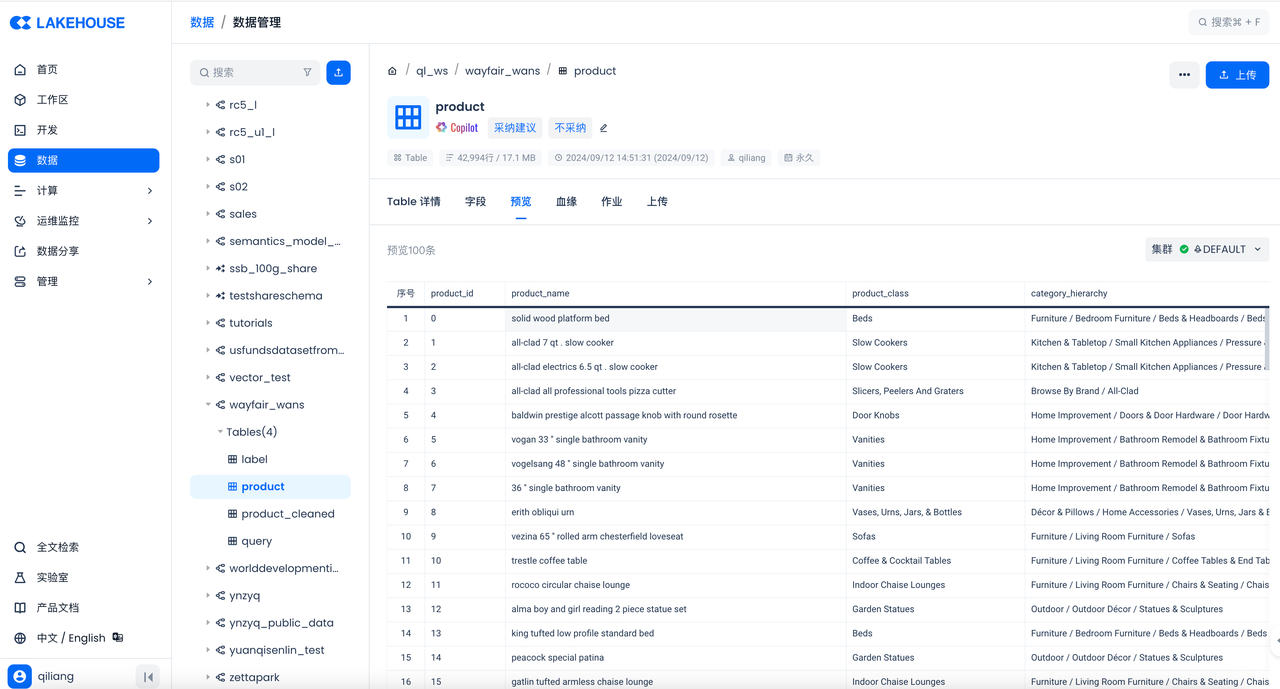
然后在云器 Lakehouse 控制台检查结果:
任务二:开发 SQL 任务,为 BI 准备数据
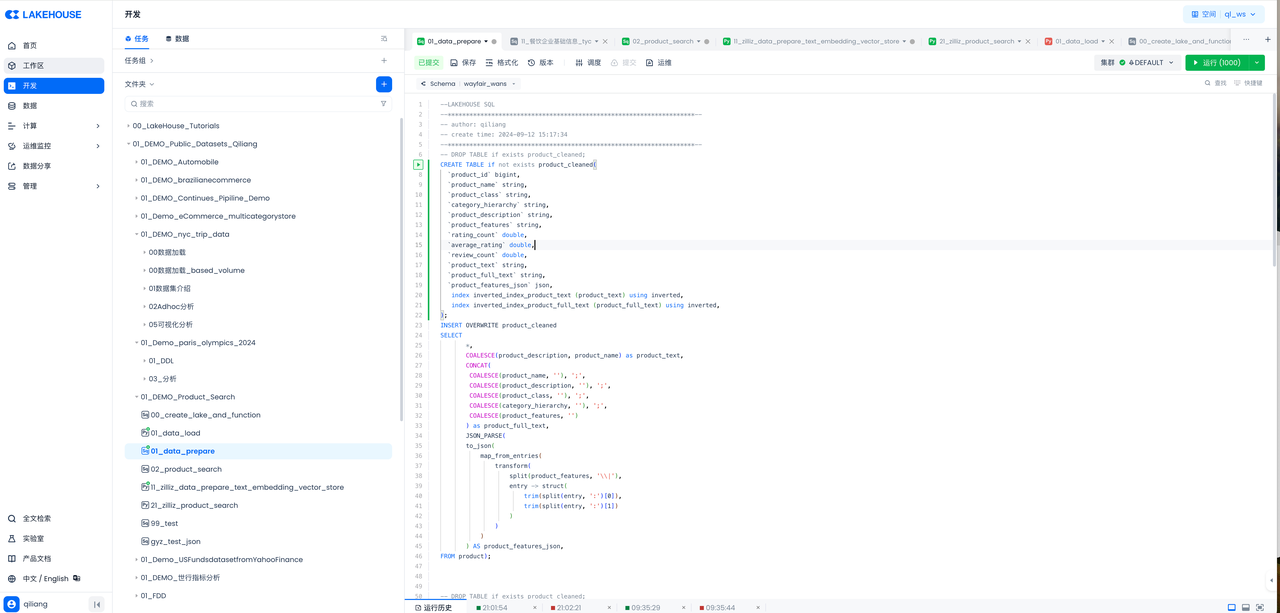
代码如下:
--LAKEHOUSE SQL
--********************************************************************--
-- author: qiliang
-- create time: 2024-09-12 15:17:34
--********************************************************************--
-- DROP TABLE if exists product_cleaned;
CREATE TABLE if not exists product_cleaned(
`product_id` bigint,
`product_name` string,
`product_class` string,
`category_hierarchy` string,
`product_description` string,
`product_features` string,
`rating_count` double,
`average_rating` double,
`review_count` double,
`product_text` string,
`product_full_text` string,
`product_features_json` json,
index inverted_index_product_text (product_text) using inverted,
index inverted_index_product_full_text (product_full_text) using inverted,
);
INSERT OVERWRITE product_cleaned
SELECT
*,
COALESCE(product_description, product_name) as product_text,
CONCAT(
COALESCE(product_name, ''), ';',
COALESCE(product_description, ''), ';',
COALESCE(product_class, ''), ';',
COALESCE(category_hierarchy, ''), ';',
COALESCE(product_features, '')
) as product_full_text,
JSON_PARSE(
to_json(
map_from_entries(
transform(
split(product_features, '\\|'),
entry -> struct(
trim(split(entry, ':')[0]),
trim(split(entry, ':')[1])
)
)
)
) AS product_features_json,
FROM product);
任务三:创建 Zilliz Data Ingestion Pipeline
Zilliz Cloud Pipelines 能够简化将非结构化数据转换为 Embedding 向量的流程,并对接 Zilliz Cloud 向量数据库存储向量数据,实现高效的向量索引和检索。开发人员在处理非结构化数据时,时常面临复杂的非结构化数据转换和检索问题,这会降低开发速度。Zilliz Cloud Pipelines 通过提供一体化解决方案来应对这一挑战,帮助开发人员轻松将非结构化数据转换为可搜索的向量,并确保在对接 Zilliz Cloud 向量数据库后能进行高质量的向量检索。
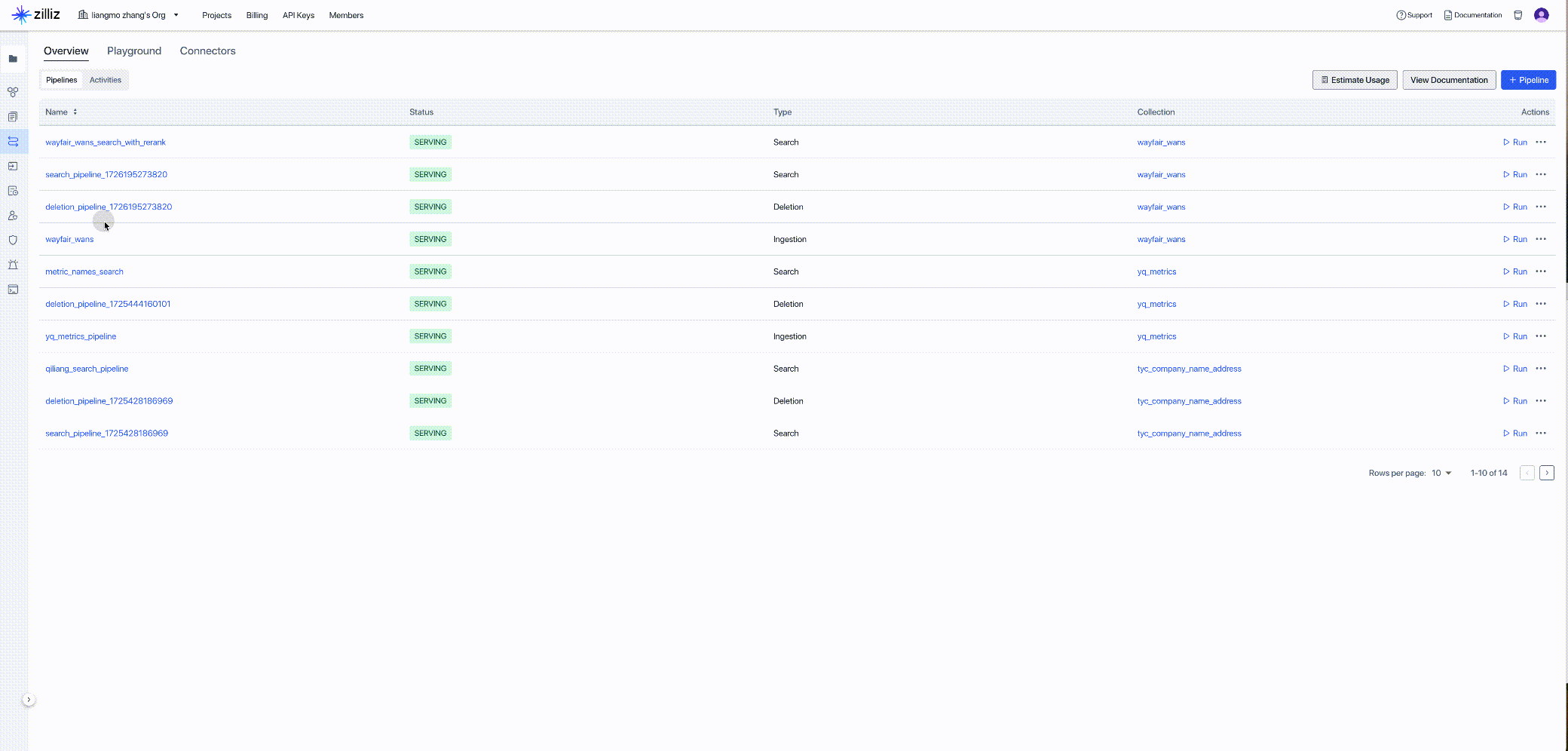
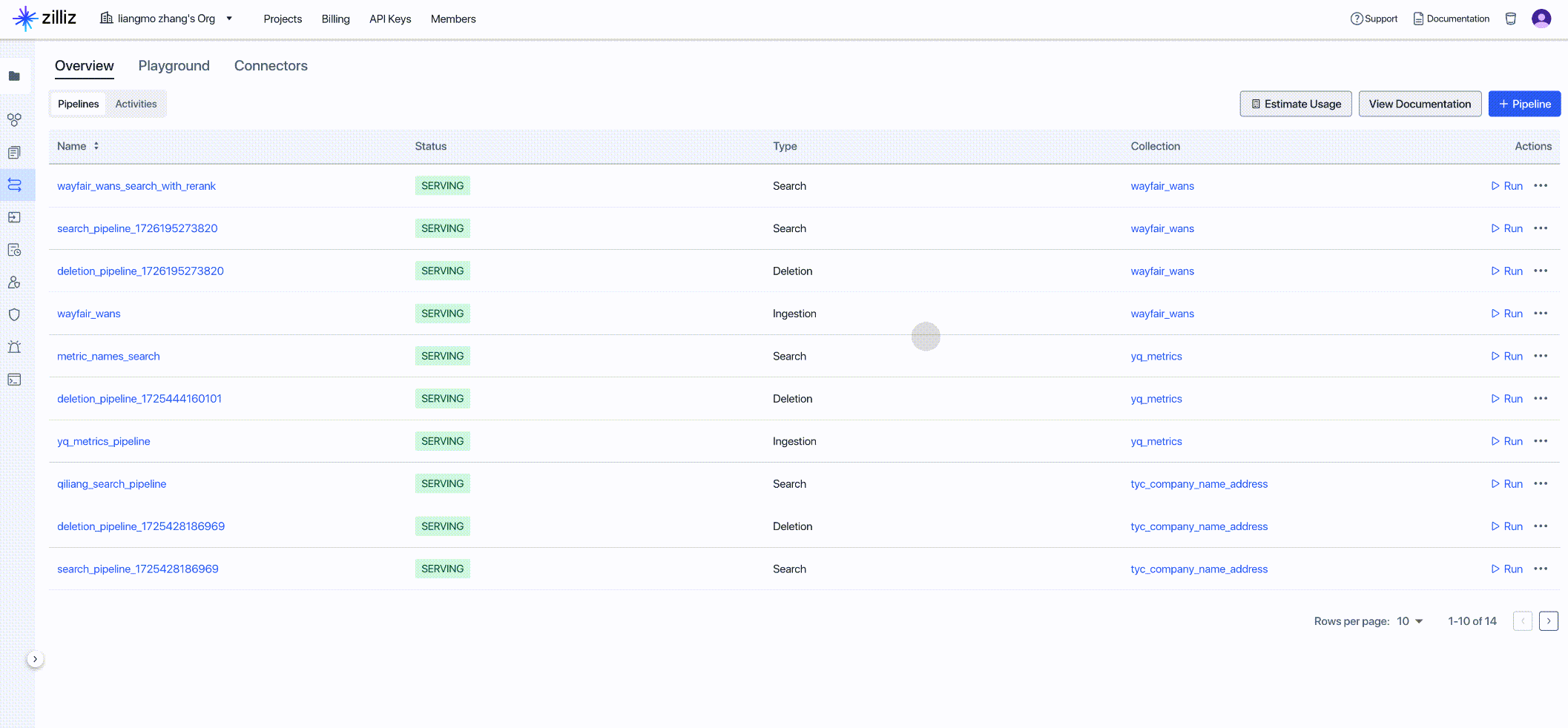
获取新创建的 Pipeline 的客户端代码,作为下一步代码的输入:
任务四:开发Python任务在工作流里调用Zilliz Data Ingestion Pipeline API,为AI增强分析准备数据,实现向量数据的ETL自动化。
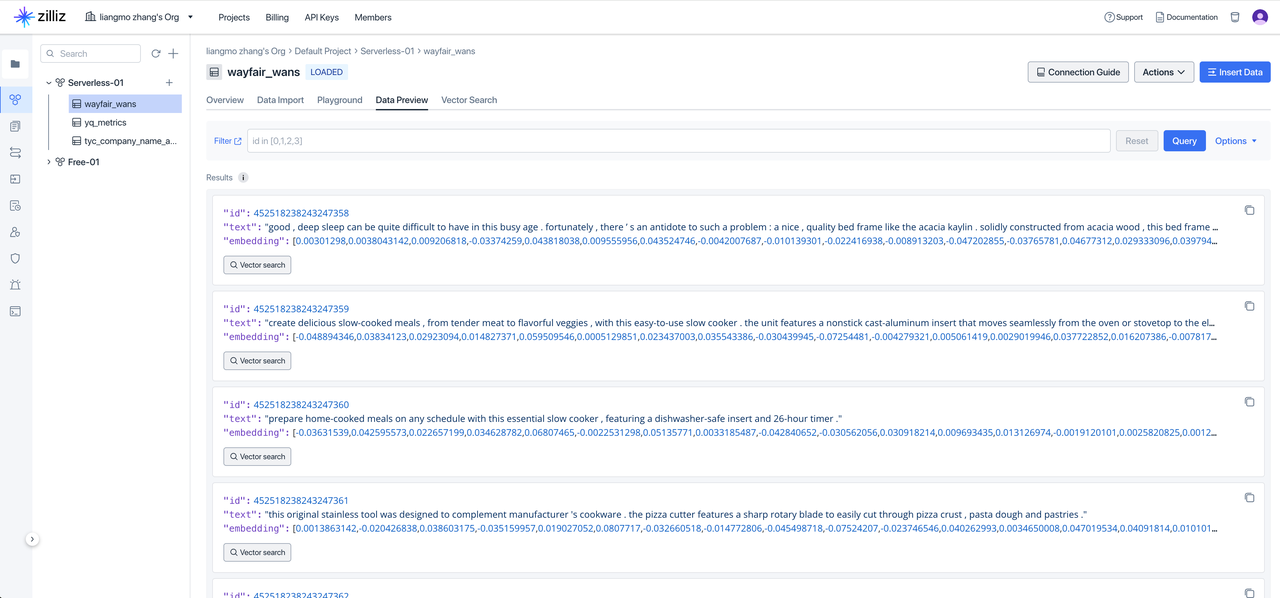
将云器 Lakehouse 中表名为 product 的文本信息发送到 Zilliz,对文本数据先进行 Embedding,然后进行向量化存储。
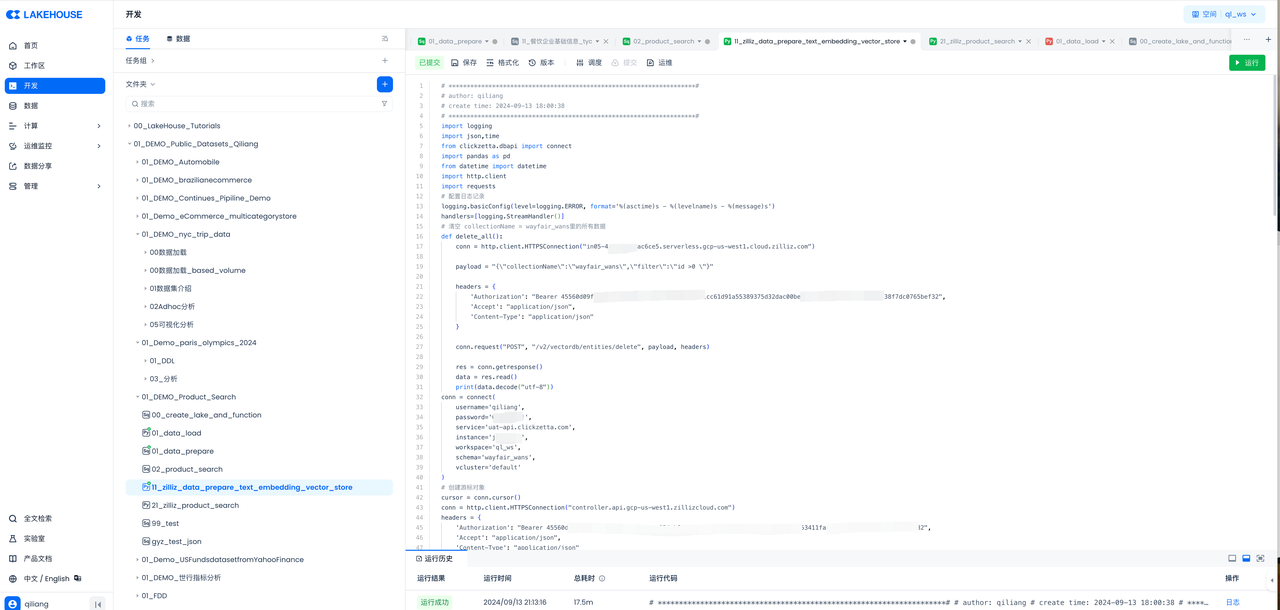
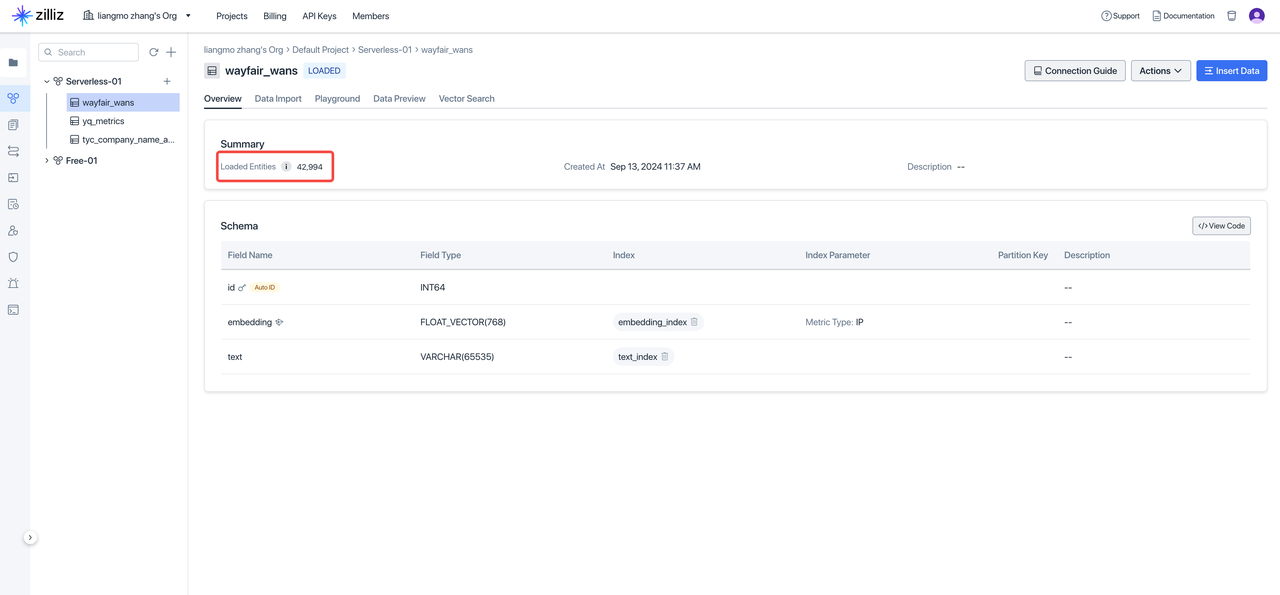
在云器 Lakehouse 中执行完上述代码后,到 Zilliz 控制台查看,验证向量化结果:
任务五:通过云器Lakehouse工作流编排定义完整的数据流程
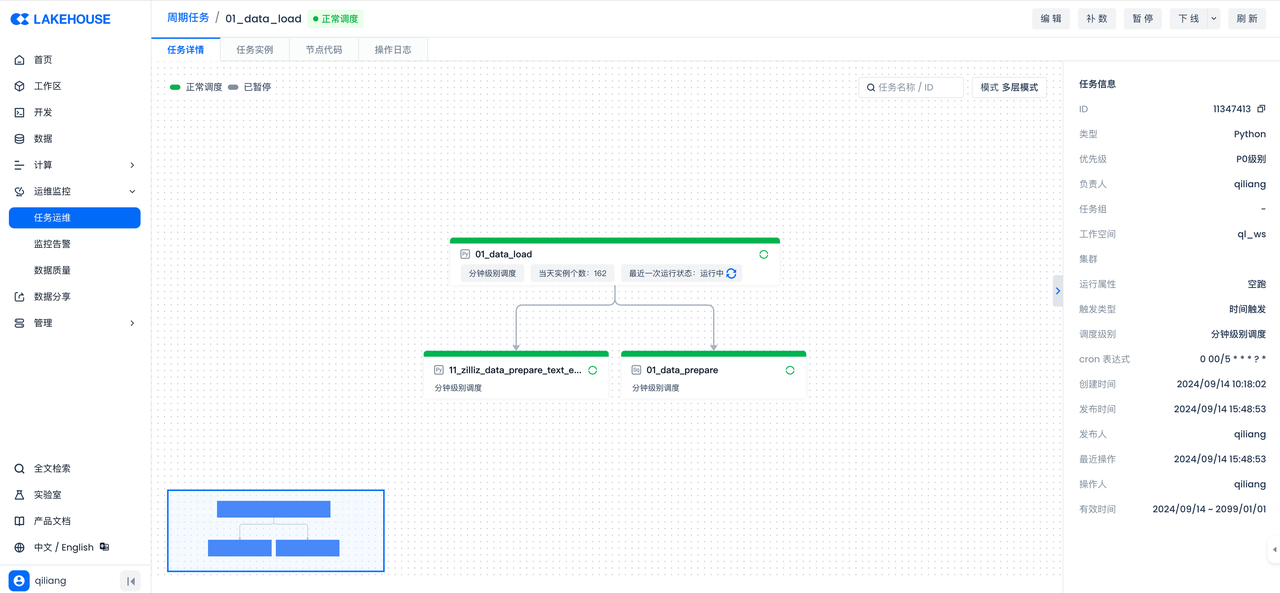
分别给上述任务设置调度属性并提交,构建数据工作流:
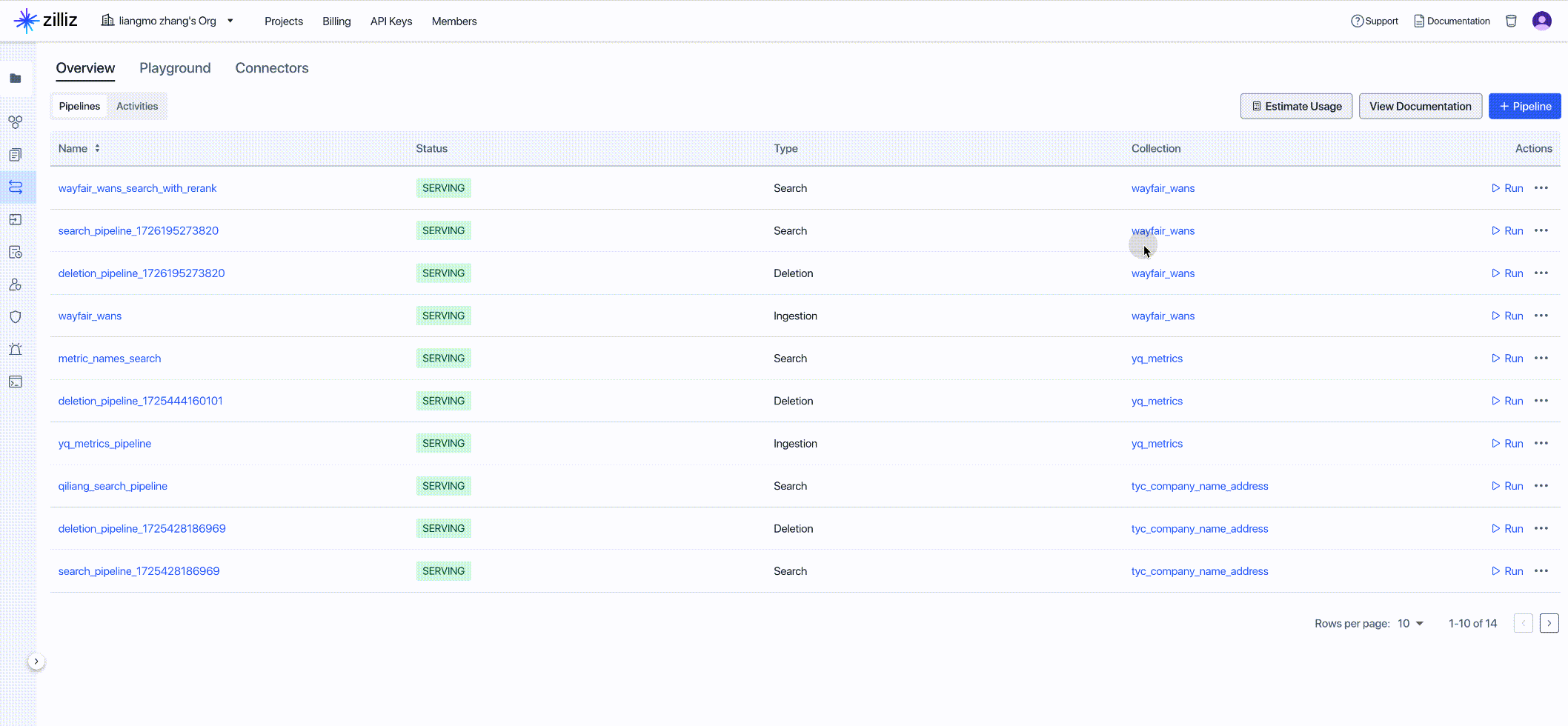
任务六:创建 Zilliz Data Search Pipeline
使用 Zilliz Data Search Pipeline 能够快速高效地将查询文本转换为 Embedding 向量,返回最相关的 top-K 个文档块(包括文本和元数据),从而有效地从搜索结果中获取数据洞察。
任务七:通过 Zilliz API 进行数据分析
import http.client
import json
conn = http.client.HTTPSConnection("controller.api.gcp-us-west1.zillizcloud.com")
headers = {
'Authorization': "Bearer ******",
'Accept': "application/json",
'Content-Type': "application/json"
}
search_without_rerank_payload = "{\"data\":{\"query_text\":\"black 5 drawer dresser by guilford\"},\"params\":{\"limit\":20,\"offset\":0,\"outputFields\":[],\"filter\":\"id >= 0\"}}"
conn.request("POST", "/v1/pipelines/pipe-e46ae76b70773f85543c93/run", search_without_rerank_payload, headers)
res = conn.getresponse()
data = res.read()
# Decode the response data
decoded_data = data.decode("utf-8")
# Parse the JSON data
parsed_data = json.loads(decoded_data)
# Pretty-print the JSON data
pretty_json = json.dumps(parsed_data, ensure_ascii=False, indent=4)
print(pretty_json)