Python/Shell 任务中使用数据源

功能概述

Python/Shell 任务,支持使用预先配置好的数据源。通过在运行环境里内置的

clickzetta-dbutils
clickzetta-dbutils
工具包,在任务中可直复用
管理->数据源
管理->数据源
中的连接配置信息,无需在节点中通过代码来重复设定,可提高敏感信息的安全性,也带来了开发和管理的便捷。

当前支持的数据源包括:

  • Lakehouse数据源
  • MySQL数据源
  • PostgreSQL数据源

界面操作指南

在Python/Shell任务中选择数据源

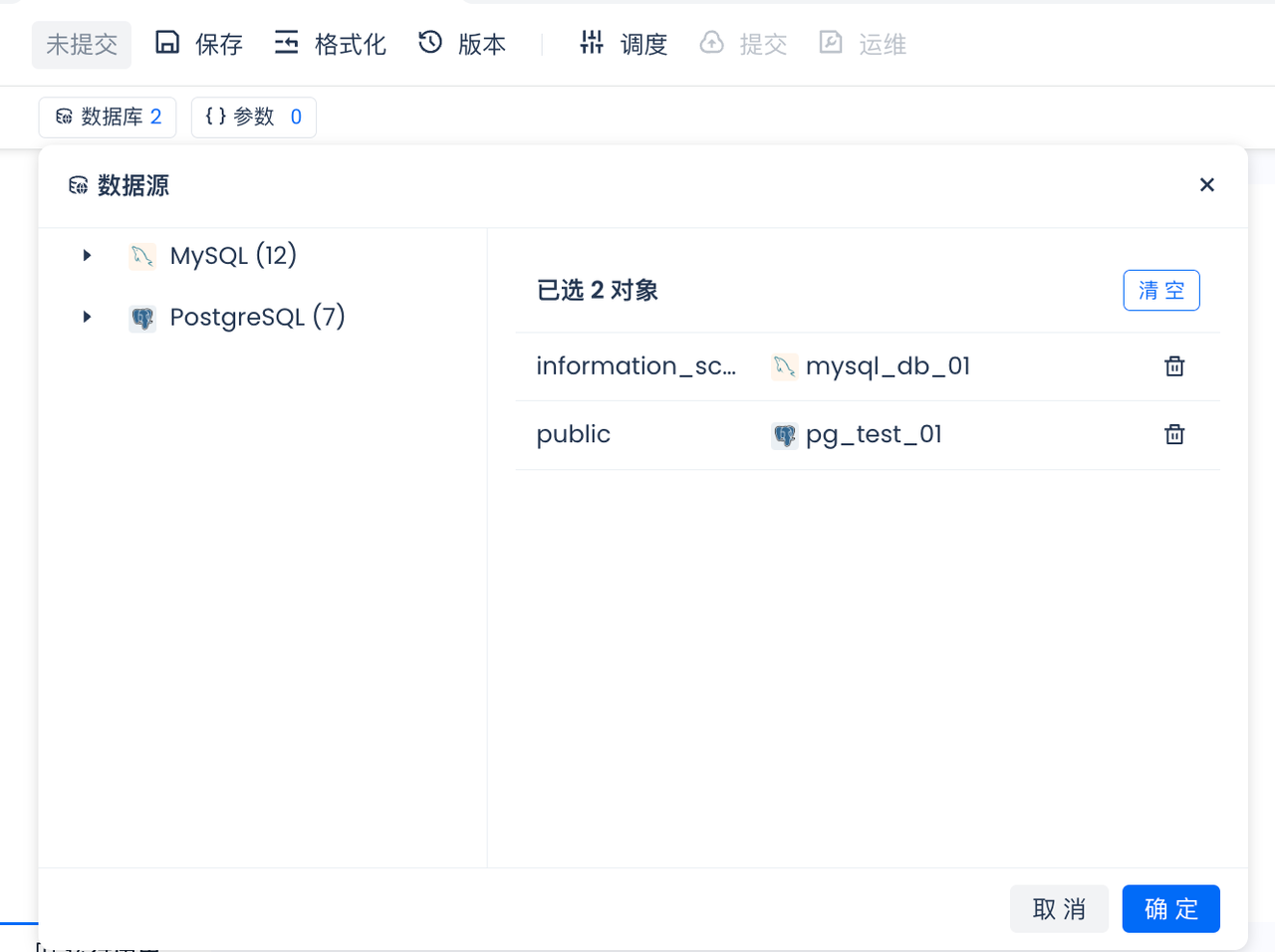
在Python/Shell任务的配置面板中,可以选择使用一个或多个数据源(确保数据源已经在管理->数据源里新建并测试连通通过)。该配置会作用于当前任务的直接运行或调度运行:

注:当前工作空间的默认 Lakehouse 数据源,在此处不需添加即可在代码里直接访问

在代码中访问数据源

添加完数据源后,即可开始编写 Python/Shell 任务代码,我们需要调用

clickzetta_dbutils
clickzetta_dbutils
python库中提供的
get_active_engine("your_datasource_name")
函数,仅需填写数据源名称,无需指定数据源URL、密码等连接信息即可完成数据源的连接。另外,还支持使用
Builder
Builder
模式,详见下文的 API 使用指南和代码示例。

API 使用指南

get_active_engine

Studio Python 节点中创建数据库引擎的便捷函数(当前支持MySQL、Postgres、Lakehouse三类数据源)。

函数签名

def get_active_engine( ds_name: Optional[str] = None, vcluster: Optional[str] = None, workspace: Optional[str] = None, schema: Optional[str] = None, options: Optional[Dict[str, str]] = None, query: Optional[Dict[str, str]] = None, driver: Optional[str] = None, host: Optional[str] = None, *args, **kwargs ) -> Engine

参数说明

  1. ds_name (str): 数据源名称,必填。该值必须要和
    管理->数据源
    管理->数据源
    里引用的数据源名称相同
  2. vcluster (str, optional): ClickZetta数据源的虚拟集群名称,对ClickZetta数据源,必填
  3. workspace (str, optional): 工作空间名称,默认为当前使用的工作空间
  4. schema (str, optional): 连接的schema名称,默认为'public'
  5. options (dict, optional): 额外的连接选项
  6. query (dict, optional): SQLAlchemy URL的额外查询参数

返回值

  • SQLAlchemy Engine实例

示例

  • 已经在
    管理->数据源
    管理->数据源
    里增加了"qiliang_test_pg"的Postgres数据源
  • 在当前Python节点里的数据库里增加了"qiliang_test_pg",并且选择的数据库为"answer", 数据库Schema为public
  • 通过get_active_engine直接访问qiliang_test_pg->answer->public里的表

from sqlalchemy import text from clickzetta_dbutils import get_active_engine pg_engine = get_active_engine("qiliang_test_pg") # 连接并执行查询 with pg_engine.connect() as pgconnection: result = pgconnection.execute(text("SELECT * FROM question limit 10;")) for row in result: print(row)

  • 通过get_active_engine设置参数访问qiliang_test_pg里其它数据库里的表(需要在
    管理->数据源
    管理->数据源
    里增加了"qiliang_test_pg"时候配置允许访问其它有权限的数据库,比如PG里的数据库为"sample", 数据库Schema为"public")

from sqlalchemy import text from clickzetta_dbutils import get_active_engine pg_engine = get_active_engine("qiliang_test_pg",schema="sample",options={"search_path":"public"}) # 连接并执行查询 with pg_engine.connect() as pgconnection: result = pgconnection.execute(text("SELECT * FROM accounts limit 10;")) for row in result: print(row)

get_active_lakehouse_engine

创建Lakehouse数据源数据库引擎的便捷函数。

函数签名

def get_active_lakehouse_engine( vcluster: Optional[str] = None, workspace: Optional[str] = None, schema: Optional[str] = None, options: Optional[Dict[str, str]] = None, query: Optional[Dict[str, str]] = None, driver: Optional[str] = None, *args, **kwargs ) -> Engine

参数说明

  1. vcluster (str, optional): ClickZetta数据源的虚拟集群名称,必填
  2. workspace (str, optional): 工作空间名称,默认为当前使用的工作空间
  3. schema (str, optional): 连接的schema名称,默认为'public'
  4. options (dict, optional): 额外的连接选项
  5. query (dict, optional): SQLAlchemy URL的额外查询参数
  6. driver (str, optional): 连接的驱动名称

返回值

  • SQLAlchemy Engine实例

异常

  • DatabaseConnectionError: 配置中未找到lakehouse数据源时抛出

示例

  • 计算
    计算
    ->
    集群
    集群
    里查看要使用的集群名称为"default"
  • 开发
    开发
    ->
    数据
    数据
    里查看要访问的数据为空间 "ql_ws" 里的schema "brazilianecommerce" 里的表 "olist_customers"
  • 通过get_active_lakehouse_engine直接访问qiliang_test_pg->answer->public里的表

from sqlalchemy import text import pandas as pd from clickzetta_dbutils import get_active_lakehouse_engine engine = get_active_lakehouse_engine(vcluster="default",schema="brazilianecommerce") # 连接并执行查询 with engine.connect() as connection: result = connection.execute(text("SELECT * FROM olist_customers limit 10;")) df = pd.DataFrame(result.fetchall(), columns=result.keys()) print(df.head(10))

DatabaseConnectionManager

数据库连接管理器,支持链式调用配置连接参数,仅在

build(self, *args, **kwargs)
被调用是才会触发 SQLAlchemy 的实际连接。

use_workspace

设置连接的工作空间,仅 Lakehouse 数据源需要设置。

def use_workspace(self, workspace: str) -> 'DatabaseConnectionManager'

use_schema

设置连接的schema。

def use_schema(self, schema: str) -> 'DatabaseConnectionManager'

由于我们使用SQLAlchemy的设计,Postgres use_schema 应该填写为 database 名称

use_vcluster

设置连接的虚拟集群,仅 Lakehouse 数据源需要设置。

def use_vcluster(self, vcluster: str) -> 'DatabaseConnectionManager'

use_options

设置额外的连接选项。

def use_options(self, options: dict) -> 'DatabaseConnectionManager'

由于我们使用SQLAlchemy的设计,Postgres schema 应该填写为

undefined"})
undefined"})

use_query

设置连接的查询参数。

def use_query(self, query: dict) -> 'DatabaseConnectionManager'

build

根据数据源名称和可选配置创建SQLAlchemy引擎。

def build(self, *args, **kwargs) -> Engine

使用示例

from clickzetta_dbutils import DatabaseConnectionManager # 链式调用示例 engine = DatabaseConnectionManager("mysql_source_name")\ .use_schema("test_schema")\ .use_options({"charset": "utf8"})\ .build() # Lakehouse连接示例 engine = DatabaseConnectionManager("LAKEHOUSE_source_name")\ .use_vcluster("default")\ .use_workspace("test-workspace")\ .use_schema("public")\ .build()

代码示例

Python节点中使用PostgreSQL数据源示例

示例为获取 postgres_source_name 数据源的所有 pg tables:

from sqlalchemy import text from clickzetta_dbutils import get_active_engine # 使用默认schema engine = get_active_engine("postgres_source_name") with engine.connect() as conn: results = conn.execute(text("SELECT * FROM pg_tables WHERE schemaname = 'public';")) for row in results: print(row) # 指定database和options中指定schema engine = get_active_engine("postgres_source_name", schema="pg_database", options={"search_path":"pg_schema"})

Python节点中使用MySQL数据源示例

from sqlalchemy import text from clickzetta_dbutils import DatabaseConnectionManager # 查看所有可用的数据源配置 print(DatabaseConnectionManager.load_connection_configs()) # 创建连接并指定schema manager = DatabaseConnectionManager("mysql_source_name") manager.use_schema("test_schema") engine = manager.build() with engine.connect() as conn: result = conn.execute(text("select * from test_table limit 1;"))

Python节点中使用Lakehouse数据源示例

from sqlalchemy import text from clickzetta_dbutils import get_active_engine # 方式一:使用get_active_engine engine = get_active_engine("LAKEHOUSE_source_name", vcluster="default", workspace="test-workspace", schema="public") # 方式二:使用get_active_lakehouse_engine from clickzetta_dbutils import get_active_lakehouse_engine engine = get_active_lakehouse_engine(vcluster="default", workspace="test-workspace") with engine.connect() as conn: results = conn.execute(text("select 1")) for row in results: print(row)

Shell节点中使用数据源示例

在Shell节点中,可以通过创建Python脚本文件的方式使用数据源:

cat >> /tmp/db_utils_demo.py << EOF from sqlalchemy import text from clickzetta_dbutils import get_active_engine engine = get_active_engine("postgres_source_name") with engine.connect() as conn: results = conn.execute(text("SELECT * FROM test_table;")) for row in results: print(row) EOF python /tmp/db_utils_demo.py

注意事项

  1. 数据源配置支持在Adhoc执行和调度执行两种场景下使用。
  2. 使用不存在的数据源名称会报错,请确保在使用前,Studio 中
    开发 -> python 任务 -> 数据源
    开发 -> python 任务 -> 数据源
    要选择相应的数据源。Postgres和MySQL数据源必须要在
    管理->数据源 
    管理->数据源
    中新建并测试连通并确保通过。
  3. 使用Lakehouse数据源时必须配置vcluster参数。Lakehouse数据源直接使用在
    管理->数据源 
    管理->数据源
    看到的内置Lakehouse数据源。
  4. 数据源的连接信息会被安全处理,可避免明文密码泄露。
  5. 支持在同一个节点中使用多个不同类型的数据源。

联系我们
预约咨询
微信咨询
电话咨询