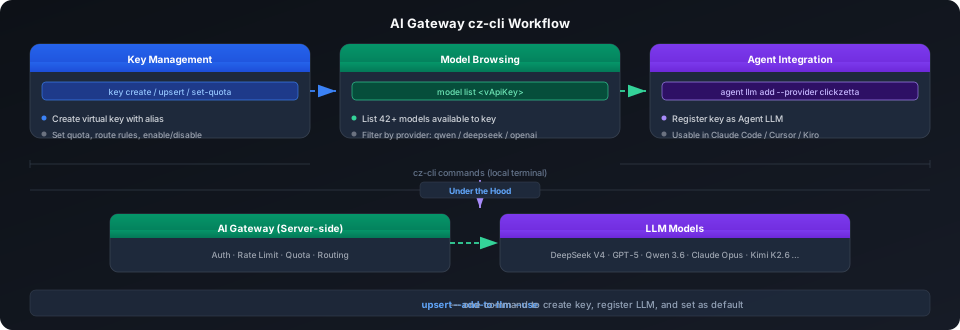
AI Gateway 模型管理:cz-cli 命令行操作
AI Gateway 的模型管理通常通过 Studio 界面操作,cz-cli 提供了对应的命令行接口——创建和配置虚拟 Key、浏览可用模型、注册为 cz-cli Agent LLM。适合自动化脚本、CI/CD 流水线,也适合在终端中快速查询模型列表。
核心流程
涉及的命令
命令 用途 cz-cli ai-gateway key listcz-cli ai-gateway key list
列出所有虚拟 Key cz-cli ai-gateway key createcz-cli ai-gateway key create
创建虚拟 Key cz-cli ai-gateway key upsertcz-cli ai-gateway key upsert
创建或更新 Key(幂等,推荐) cz-cli ai-gateway key getcz-cli ai-gateway key get
查看 Key 完整值 cz-cli ai-gateway key enable/disablecz-cli ai-gateway key enable/disable
启用/禁用 Key cz-cli ai-gateway key deletecz-cli ai-gateway key delete
删除 Key cz-cli ai-gateway key set-quotacz-cli ai-gateway key set-quota
设置 Key 的 Token 配额 cz-cli ai-gateway model listcz-cli ai-gateway model list
查看 Key 可调用的模型 cz-cli agent llm add ... --provider clickzettacz-cli agent llm add ... --provider clickzetta
将 Key 注册为 Agent LLM
管理虚拟 Key
列出已有 Key
cz-cli ai-gateway key list
{
"data": [
{
"id": 716,
"alias": "qiliang",
"vApiKey": "50db****7f61",
"status": 1
}
],
"count": 1,
"ai_message": "Page 1, showing 1 of 1 virtual keys."
}
字段 说明 idid
Key 的唯一 ID aliasalias
Key 别名,创建时指定 vApiKeyvApiKey
Key 值,脱敏显示(前 4 位 + 后 4 位)。完整值用于后续所有操作,脱敏值和 alias 不可用 statusstatus
1=启用,0=禁用
创建 Key
cz-cli ai-gateway key create my_key
{
"data": {
"id": 736,
"alias": "my_key",
"vApiKey": "c081****dae5"
},
"ai_message": "Virtual key created. To use it with the agent run: cz-cli agent llm add my_key --provider clickzetta --api-key <vApiKey> --base-url https://... --use"
}
⚠️ 注意 :
vApiKeyvApiKey
只在
key createkey create
时返回完整值,
key listkey list
中只显示脱敏值(如
a12f****950ca12f****950c
)。后续所有操作(
getget
、
disabledisable
、
enableenable
、
deletedelete
、
set-quotaset-quota
、
model listmodel list
)都需要
完整 vApiKey ,alias 和脱敏值均不可用。请创建后立即保存完整 Key。
创建或更新 Key(upsert,推荐)
upsertupsert
具有幂等性——Key 已存在时更新配置,不存在时创建。适合脚本中重复执行:
# 基础创建
cz-cli ai-gateway key upsert prod_key \
--quota 1000000 --period monthly
# 创建后直接注册为 Agent LLM(跳过手动 add)
cz-cli ai-gateway key upsert my_agent \
--quota 500000 --period daily \
--add-to-llm --use
upsert 参数说明:
参数 说明 --quota--quota
Token 配额数值 --period--period
配额周期:dailydaily
/ weeklyweekly
/ monthlymonthly
/ totaltotal
(长期) --route-type--route-type
路由规则:defaultdefault
(内置模型) / providerprovider
(指定供应商) / byokbyok
(自带 Key) --providers--providers
指定供应商 ID(route-type=providerroute-type=provider
时使用) --provider-sort--provider-sort
排序策略(route-type=defaultroute-type=default
时使用):priceprice
/ throughputthroughput
/ latencylatency
--private-keys--private-keys
BYOK Key 别名列表(route-type=byokroute-type=byok
时使用) --add-to-llm--add-to-llm
自动注册为 ~/.clickzetta/profiles.toml~/.clickzetta/profiles.toml
中的 [llm.<name>][llm.<name>]
,值为 alias --use--use
同时设为活跃 LLM
修改配额
cz-cli ai-gateway key set-quota \
--key "<完整 vApiKey>" \
--period daily \
--quota 2000000
{
"data": {
"id": 716,
"period": "daily",
"quota": 2000000
}
}
启用 / 禁用 / 删除
# 需要完整的 vApiKey,alias 和脱敏值均不可用
cz-cli ai-gateway key disable "<完整 vApiKey>"
cz-cli ai-gateway key enable "<完整 vApiKey>"
cz-cli ai-gateway key delete "<完整 vApiKey>"
操作 输出 disable {"data": {"id": 738, "status": 0}}{"data": {"id": 738, "status": 0}}
enable {"data": {"id": 738, "status": 1}}{"data": {"id": 738, "status": 1}}
delete {"data": {"id": 738, "deleted": true}}{"data": {"id": 738, "deleted": true}}
浏览可用模型
cz-cli ai-gateway model list "<完整 vApiKey>"
⚠️ 注意 :传脱敏值(如
a12f****950ca12f****950c
)会静默返回
{"data":[],"count":0}{"data":[],"count":0}
,不会报错,容易误以为自己没有可用模型。必须传
key createkey create
时得到的完整值。
输出为该 Key 可见的模型列表,格式如下(实际返回 42 个模型):
{
"data": [
{"modelIdentifier": "qwen/qwen3.7-max", "modelName": "Qwen3.7 Max"},
{"modelIdentifier": "byteplus/dola-seed-2-0-pro", "modelName": "ByteDance Dola Seed 2.0 pro"},
{"modelIdentifier": "minimax/MiniMax-M2.7", "modelName": "MiniMax M2.7"},
{"modelIdentifier": "openai/gpt-4.1", "modelName": "GPT-4.1"},
{"modelIdentifier": "deepseek/deepseek-v4-pro", "modelName": "DeepSeek V4 Pro"}
],
"count": 42
}
字段 说明 modelIdentifiermodelIdentifier
模型唯一标识,如 deepseek/deepseek-v4-prodeepseek/deepseek-v4-pro
,用于 AI_COMPLETE()AI_COMPLETE()
modelNamemodelName
模型显示名,如 DeepSeek V4 ProDeepSeek V4 Pro
modelInvokeStatusmodelInvokeStatus
1=可调用
模型标识符格式为
<提供商>/<模型名><提供商>/<模型名>
,这是 AI_COMPLETE 调用中使用的完整名称。
注册为 Agent LLM
cz-cli 内置的 AI Agent 需要一个 LLM 驱动,AI Gateway 的虚拟 Key 可以作为 Agent LLM 使用。
方式一:upsert 时一步完成
cz-cli ai-gateway key upsert my_agent \
--quota 500000 --period daily \
--add-to-llm --use
{
"data": {
"id": 737,
"alias": "demo-key",
"vApiKey": "ed42****f942"
}
}
--add-to-llm--add-to-llm
将 Key 写入
~/.clickzetta/profiles.toml~/.clickzetta/profiles.toml
的
[llm.my_agent][llm.my_agent]
段,
--use--use
将其设为默认 LLM。
方式二:手动注册
从
key getkey get
获取完整 Key 值,然后手动添加:
cz-cli agent llm add my_agent \
--provider clickzetta \
--api-key "<完整虚拟 Key>" \
--base-url "https://cn-shanghai-alicloud-aimesh.api.clickzetta.com/gateway/v1" \
--use
provider 为
clickzettaclickzetta
时,
--base-url--base-url
必须填 AI Gateway 的 Base URL。
AI Gateway Base URL 按地域:
地域 Base URL 阿里云上海 https://cn-shanghai-alicloud-aimesh.api.clickzetta.com/gateway/v1https://cn-shanghai-alicloud-aimesh.api.clickzetta.com/gateway/v1
腾讯云上海 https://ap-shanghai-tencentcloud-aimesh.api.clickzetta.com/gateway/v1https://ap-shanghai-tencentcloud-aimesh.api.clickzetta.com/gateway/v1
AWS 新加坡 https://ap-southeast-1-aws-aimesh.api.singdata.com/gateway/v1https://ap-southeast-1-aws-aimesh.api.singdata.com/gateway/v1
测试连接
cz-cli agent llm test my_agent
{
"data": {
"message": "[llm.my_agent] test passed.",
"name": "my_agent",
"provider": "clickzetta",
"url": "https://cn-shanghai-alicloud-aimesh.api.clickzetta.com/gateway/v1/chat/completions",
"probe": "chat.completions",
"source": "llm"
}
}
查看和切换 LLM
cz-cli agent llm show # 查看所有 LLM 配置
cz-cli agent llm list # 列出所有 [llm.*] 条目
cz-cli agent llm use my_agent # 切换活跃 LLM
用法示例
场景:为开发团队批量创建 AI Gateway Key
# 为每个开发者创建 Key
for name in alice bob carol; do
cz-cli ai-gateway key upsert "dev_${name}" \
--quota 100000 --period daily \
--route-type default --provider-sort price
done
# 查看所有 Key
cz-cli ai-gateway key list
场景:查询特定供应商的模型
# 获取 Key 并查看可用模型
cz-cli ai-gateway model list "<完整 vApiKey>"
# 筛选 DeepSeek 供应商的模型
cz-cli ai-gateway model list "<完整 vApiKey>" --format json | \
python3 -c "
import json, sys
data = json.load(sys.stdin)
for m in data['data']:
if m['modelIdentifier'].startswith('deepseek'):
print(m['modelIdentifier'], m['modelName'])
"
场景:注册 Agent LLM 并切换
# 一步完成
cz-cli ai-gateway key upsert agent_prod \
--quota 5000000 --period monthly \
--add-to-llm --use
# 验证
cz-cli agent llm test agent_prod
注意事项
注意点 说明 vApiKey 安全 key listkey list
返回值脱敏,key getkey get
返回完整值。不要将完整 Key 写入日志或提交到 gitKey 名称 建议用 aliasalias
区分用途:dev_alicedev_alice
、prod_agentprod_agent
、staging_teststaging_test
配额生效 配额修改立即可用,不需要重启服务 model list 输出 数据量大时建议用 --format json--format json
后管道过滤 clickzetta provider 需要 --api-key--api-key
+ --base-url--base-url
两个参数,缺一不可;也可在 upsert 时用 --add-to-llm--add-to-llm
自动注入 provider 选项 agent llm addagent llm add
支持 clickzettaclickzetta
/ openaiopenai
/ openai-compatibleopenai-compatible
/ anthropicanthropic
/ bedrockbedrock
/ googlegoogle
/ azureazure
/ openrouteropenrouter
相关文档