半结构化数据分析:JSON 类型
JSON(JavaScript Object Notation)是一种轻量级、易于阅读和编写的半结构化数据格式。它基于 JavaScript 的一个子集,但独立于语言,许多编程语言都有 JSON 数据格式的解析和生成代码。JSON 格式使用文本表示简单的数据结构,如对象、数组、字符串、数字和布尔值,具有良好的可读性和简洁性,是理想的数据交换格式。
Lakehouse 中的 JSON 类型
在 Lakehouse 中,JSON 类型的数据可以高效地存储和查询。JSON 数据在 Lakehouse 中会被解析,并根据数据的实际结构进行优化存储。以下是 Lakehouse 中 JSON 类型的一些特点:
- 查询性能:使用 JSON 类型相比于 String 类型在查询性能上有明显优势,因为 Lakehouse 会对 JSON 数据进行列裁剪,减少不必要的数据扫描。
- 数据重排:解析过程中,JSON 对象的数据可能会被重新排序,因此输入和输出的 JSON 数据可能在键的顺序上不一致。
- 数字解析:解析 JSON 数字时,Lakehouse 会优先尝试将其解析为 bigint 类型。如果数字超出 bigint 的范围,则会将其解析为 double 类型。需要注意的是,double 类型可能会有精度损失。
- 错误处理:使用函数解析 JSON 数据时,Lakehouse 会进行校验。对于非法的 JSON 字符串,会返回 NULL 值;而在声明 JSON 常量时,非法的 JSON 字符串会导致错误。
此外,Lakehouse 在写入过程中会根据实际的 JSON Schema,将出现频次高的字段按照列存储的方式存储,以提高存储和查询效率。例如:
CREATE TABLE json_table AS
SELECT parse_json(s) as j
FROM VALUES
('{"id": 1, "value": "200"}'),
('{"id": 2, "value": "300"}'),
('{"id": 3, "value": "400", "extra": 1}'),
('{"value": "100"}') as t(s);
对于上面的数据,Lakehouse 检测出 id 和 value 出现频次高,分别适合用 bigint 和 string 类型列式存储,则会在内部以类似 struct<id:bigint, value:string> 的结构存储。在后续的查询过程中,如果只读取 id 字段且转换为 bigint,如
SELECT json_extract_bigint(j, '$.id')
SELECT json_extract_bigint(j, '$.id')
,则可以直接按列读取 id 字段,并消除类型转换的开销。
对于出现频次低的 extra 字段,则保留 json 结构且用更加紧凑的表示存储,避免产生过于稀疏的数据。
限制
- 不支持对 JSON 类型的比较操作,也不支持对 JSON 类型进行
ORDER BY
ORDER BY
、GROUP BY
GROUP BY
或作为 JOIN
JOIN
的 key 等。
- 不支持作为 cluster key、primary key、partition key。
- JSON 字符串最大长度为 16 MB。批量、实时导入时对字段进行长度校验。如果导入数据中有大于 16 MB 的字段,可以修改表的 Properties 将 JSON 长度上限调整为 32 MB:
ALTER TABLE table_name SET PROPERTIES("cz.storage.write.max.json.bytes"="33554432");
创建JSON列的表
要创建包含JSON类型列的表,可以使用以下SQL语句:
CREATE TABLE json_example
(
id bigint,
data json
);
构建JSON数据
JSON常量
在SQL查询中,可以使用JSON常量来表示JSON数据。例如:
SELECT
JSON 'null',
JSON '1',
JSON '3.14',
JSON 'true',
JSON 'false',
JSON '{"id":11,"name":"Lakehouse"}',
JSON '[0, 1]';
-- !query output
+-------------+----------+-------------+-------------+--------------+-------------------------------------+---------------+
| JSON 'null' | JSON '1' | JSON '3.14' | JSON 'true' | JSON 'false' | JSON '{"id":11,"name":"Lakehouse"}' | JSON '[0, 1]' |
+-------------+----------+-------------+-------------+--------------+-------------------------------------+---------------+
| null | 1 | 3.14 | true | false | {"id":11,"name":"Lakehouse"} | [0,1] |
+-------------+----------+-------------+-------------+--------------+-------------------------------------+---------------+
语法
--键名访问JSON对象中的字段
json_column['key']['key']...
--通过索引访问JSON数组中的元素
json_array[index]
参数说明
json_column
json_column
:表示一个 JSON 字段,类型为 JSON 对象。通过键名(key
key
,指定为字符串)来定位并检索 JSON 对象内的特定数据字段。使用单个方括号 []
[]
可以访问对象的一级字段;嵌套使用 [][]
[][]
则能够深入检索二级或更深层次的字段。json_array
json_array
:数组类型的 JSON,用来根据 index 访问 JSON array 的元素,起始值为 0。
案例
取出json一级结构
SELECT parse_json(s)['firstName'] as j
FROM VALUES ('{ "firstName": "John", "lastName": "doe", "age": 26, "address": { "streetAddress": "naist street", "city": "Nara", "postalCode": "630-0192" }, "phoneNumbers": [ { "type": "iPhone", "number": "0123-4567-8888" }, { "type": "home", "number": "0123-4567-8910", "extra": [] } ] }'),
('{ "firstName": "Ada", "lastName": "doe", "age": 20, "address": { "streetAddress": "naist street", "city": "Nara", "postalCode": "630-0192" }, "address2": {"city": "NewYork"}, "phoneNumbers": [ { "type": "iPhone", "number": "0123-4567-8888" }, { "type": "home", "number": "0123-4567-8910", "extra": [1,2,3] } ] }')
as t(s);
取出json二级结构
SELECT parse_json(s)['address']['streetAddress'] as j
FROM VALUES ('{ "firstName": "John", "lastName": "doe", "age": 26, "address": { "streetAddress": "naist street", "city": "Nara", "postalCode": "630-0192" }, "phoneNumbers": [ { "type": "iPhone", "number": "0123-4567-8888" }, { "type": "home", "number": "0123-4567-8910", "extra": [] } ] }'),
('{ "firstName": "Ada", "lastName": "doe", "age": 20, "address": { "streetAddress": "naist street", "city": "Nara", "postalCode": "630-0192" }, "address2": {"city": "NewYork"}, "phoneNumbers": [ { "type": "iPhone", "number": "0123-4567-8888" }, { "type": "home", "number": "0123-4567-8910", "extra": [1,2,3] } ] }')
as t(s);
取出json数组中的元素
SELECT parse_json(s)['phoneNumbers'][0]['number'] as j
FROM VALUES ('{ "firstName": "John", "lastName": "doe", "age": 26, "address": { "streetAddress": "naist street", "city": "Nara", "postalCode": "630-0192" }, "phoneNumbers": [ { "type": "iPhone", "number": "0123-4567-8888" }, { "type": "home", "number": "0123-4567-8910", "extra": [] } ] }'),
('{ "firstName": "Ada", "lastName": "doe", "age": 20, "address": { "streetAddress": "naist street", "city": "Nara", "postalCode": "630-0192" }, "address2": {"city": "NewYork"}, "phoneNumbers": [ { "type": "iPhone", "number": "0123-4567-8888" }, { "type": "home", "number": "0123-4567-8910", "extra": [1,2,3] } ] }')
as t(s);
JSON 常量查询中的 parse_json
SELECT parse_json(s) is null, parse_json(s)
FROM VALUES ('null'),
('1'),
('3.14'),
('true'),
('false'),
('{"id":11,"name":"Lakehouse"}'),
('[0, 1]'),
(''),
('invalid') as t(s);
+-------------------------+------------------------------+
| (parse_json(s)) IS NULL | parse_json(s) |
+-------------------------+------------------------------+
| false | null |
| false | 1 |
| false | 3.14 |
| false | true |
| false | false |
| false | {"id":11,"name":"Lakehouse"} |
| false | [0,1] |
| true | null |
| true | null |
+-------------------------+------------------------------+
- 如果
parse_json
parse_json
的参数为非法 JSON 字符串,则返回 SQL null,is null
is null
的结果为 true。
- 如果输入字符串为
'null'
'null'
,则它会被解释为 JSON null 值,is null
is null
的结果为 false。
json_array/json_object
类似
array
array
/
named_struct
named_struct
,可以根据已有的数据构造出对应的 JSON 类型。
SELECT json_array(), json_array(NULL),json_array(NULL::int, 1, TRUE, FALSE, NULL::int, "a", 1.2, 1.3d);
+----------------+--------------------+--------------------------------------------------------------------------------------+
| `json_array`() | `json_array`(NULL) | `json_array`(CAST(NULL AS int), 1, true, false, CAST(NULL AS int), 'a', 1.2BD, 1.3d) |
+----------------+--------------------+--------------------------------------------------------------------------------------+
| [] | [null] | [null,1,true,false,null,"a","1.2",1.3] |
+----------------+--------------------+--------------------------------------------------------------------------------------+
SELECT json_object(), json_object('k', NULL), json_object('k1', json_array(1, "a"), "k2", array(1, 2, 3));
-- !query output
+-----------------+--------------------------+-------------------------------------------------------------------+
| `json_object`() | `json_object`('k', NULL) | `json_object`('k1', `json_array`(1, 'a'), 'k2', `array`(1, 2, 3)) |
+-----------------+--------------------------+-------------------------------------------------------------------+
| {} | {"k":null} | {"k1":[1,"a"],"k2":[1,2,3]} |
+-----------------+--------------------------+-------------------------------------------------------------------+
类型转换
在 Lakehouse 中,可以使用
::json
::json
或
CAST
CAST
函数将其他类型转换为 JSON 类型。以下是一些类型转换的例子:
| |
|---|
| Json | SQL |
| Object | Struct |
| Array | Array |
| String | string |
| Number | bigint/double |
| true/false | bool |
| Null | 无对应类型 |
| 无对应类型 | binary |
- 不存在于表格中的类型转换,会先将其转换为可以转换的类型(大多数情况为 string 类型),再转换为目标类型,例如
cast(1.2 as json)
cast(1.2 as json)
,1.2 为 decimal 类型,会先转换为 string 类型,进一步转换为 json 类型,结果是 JSON '"1.2"'
JSON '"1.2"'
,而不是 JSON '1.2'
JSON '1.2'
。
- 需要注意的是,
cast(string as json)
cast(string as json)
的语义和 parse_json(string)
parse_json(string)
的语义并不一致。parse_json
parse_json
会尝试将 JSON 字符串解析成 JSON 对象,如果 JSON 格式不正确,则会生成 NULL;而 cast(string as json)
cast(string as json)
会将字符串整体当做 JSON 中的 string 类型,所以如果你有一个 JSON 格式字符串需要转化,应该使用 parse_json
parse_json
。
具体案例:
-- xx::json 等价于 cast(xxx as json)
SELECT 0::json;
-- !query output
+-----------------+
| CAST(0 AS json) |
+-----------------+
| 0 |
+-----------------+
SELECT 1.2F::json;
-- !query output
+--------------------+
| CAST(1.2F AS json) |
+--------------------+
| 1.2000000476837158 |
+--------------------+
SELECT 1.2::json;
-- !query output
+---------------------+
| CAST(1.2BD AS json) |
+---------------------+
| "1.2" |
+---------------------+
SELECT 's'::json;
+-------------------+
| CAST('s' AS json) |
+-------------------+
| "s" |
+-------------------+
SELECT (timestamp '2020-10-10 00:00:00') ::json;
+----------------------------------------------+
| CAST(timestamp'2020-10-10 00:00:00' AS json) |
+----------------------------------------------+
| "2020-10-10 00:00:00" |
+----------------------------------------------+
SELECT (date '2020-10-10') ::json;
+---------------------------------+
| CAST(DATE '2020-10-10' AS json) |
+---------------------------------+
| "2020-10-10" |
+---------------------------------+
SELECT array(1, 2, 3) ::json;
+--------------------------------+
| CAST(`array`(1, 2, 3) AS json) |
+--------------------------------+
| [1,2,3] |
+--------------------------------+
SELECT array(1, null, 3) ::json;
+-----------------------------------+
| CAST(`array`(1, NULL, 3) AS json) |
+-----------------------------------+
| [1,null,3] |
+-----------------------------------+
SELECT map("a", 2, "b", 4)::json, map("a", 2, "b", null) ::json;
+-----------------------------------+--------------------------------------+
| CAST(map('a', 2, 'b', 4) AS json) | CAST(map('a', 2, 'b', NULL) AS json) |
+-----------------------------------+--------------------------------------+
| {"a":2,"b":4} | {"a":2,"b":null} |
+-----------------------------------+--------------------------------------+
SELECT struct(1, 2, 3, 4)::json, struct(1, 2, 3, null::int) ::json;
+---------------------------------------+--------------------------------------------------+
| CAST(struct(1, 2, 3, 4) AS json) | CAST(struct(1, 2, 3, CAST(NULL AS int)) AS json) |
+---------------------------------------+--------------------------------------------------+
| {"col1":1,"col2":2,"col3":3,"col4":4} | {"col1":1,"col2":2,"col3":3,"col4":null} |
+---------------------------------------+--------------------------------------------------+
SELECT null::json;
+--------------------+
| CAST(NULL AS json) |
+--------------------+
| null |
+--------------------+
SELECT j::string, j::char(2), j::bigint, j::double, j::decimal(9, 4), j::boolean, j::json, j::array<int>
from values (json '123'),
(json '1.23'),
(json 'null'),
(json 'true'),
(json 'false'),
(json '"abc"'),
(json '{"a":2}'),
(json '[1,2]') t(j);
-- !query output
+-------------------+--------------------+-------------------+-------------------+-------------------------+--------------------+-----------------+-----------------------+
| CAST(j AS string) | CAST(j AS char(2)) | CAST(j AS bigint) | CAST(j AS double) | CAST(j AS decimal(9,4)) | CAST(j AS boolean) | CAST(j AS json) | CAST(j AS array<int>) |
+-------------------+--------------------+-------------------+-------------------+-------------------------+--------------------+-----------------+-----------------------+
| 123 | 12 | 123 | 123.0 | 123.0000 | true | 123 | null |
| 1.23 | 1. | 1 | 1.23 | 1.2300 | true | 1.23 | null |
| null | null | null | null | null | null | null | null |
| true | tr | 1 | 1.0 | 1.0000 | true | true | null |
| false | fa | 0 | 0.0 | 0.0000 | false | false | null |
| abc | ab | null | null | null | null | "abc" | null |
| {"a":2} | {" | null | null | null | null | {"a":2} | null |
| [1,2] | [1 | null | null | null | null | [1,2] | [1,2] |
+-------------------+--------------------+-------------------+-------------------+-------------------------+--------------------+-----------------+-----------------------+
以下示例直观展示两者的差异:
SELECT parse_json(s), s::json, s::json::string
FROM VALUES ('{"id":11, "name": "Lakehouse"}') as t(s);
+------------------------------+----------------------------------------+---------------------------------+
| parse_json(s) | CAST(s AS json) | CAST(CAST(s AS json) AS string) |
+------------------------------+----------------------------------------+---------------------------------+
| {"id":11,"name":"Lakehouse"} | "{\"id\":11, \"name\": \"Lakehouse\"}" | {"id":11, "name": "Lakehouse"} |
+------------------------------+----------------------------------------+---------------------------------+
使用 SDK 写入 JSON
Lakehouse 支持给 JSON 类型的列写入 String 类型的字符串,系统在导入的时候会自动将字符串解析成 JSON 类型,如果用户输入了不符合 JSON 规范或者 CZ 不支持的 JSON 字符串,系统会报错并停止导入。
导出 JSON 数据
Lakehouse 支持以字符串的形式导出 JSON 数据。
查询 JSON 数据
查询 JSON 数据需要使用
json_extract
json_extract
系列函数,通过 JSON path 获取需要的数据。以下是一些查询 JSON 数据的例子:
- json_extract
- json_extract_boolean
- json_extract_float
- json_extract_double
- json_extract_int
- json_extract_bigint
- json_extract_string
- json_extract_date
- json_extract_timestamp
json path 规范
json_extract
json_extract
的第二个参数为 json path,可以参考
json path 规范
$
$
表示根元素.key
.key
或 ['key']
['key']
用来查找 json object 中的 key。特殊的,[*]
[*]
表示获取所有的 value,要求必须是单引号[index]
[index]
用来根据 index 访问 json array 的元素,起始值为 0。特殊的,[*]
[*]
表示所有的元素
SELECT json_extract(j, "$[0]"),
json_extract(j, "$[1]"),
json_extract(j, "$[*]")
FROM VALUES (JSON '["a", 1, null]') as t(j);
+-------------------------+-------------------------+-------------------------+
| json_extract(j, '$[0]') | json_extract(j, '$[1]') | json_extract(j, '$[*]') |
+-------------------------+-------------------------+-------------------------+
| "a" | 1 | ["a",1,null] |
+-------------------------+-------------------------+-------------------------+
SELECT json_extract(j, "$.key"),
json_extract(j, "$['key.with.dot']"),
json_extract(j, "$[*]")
FROM VALUES (JSON '{"key":1, "key.with.dot":2}') as t(j);
+--------------------------+----------------------------------------+-------------------------+
| json_extract(j, '$.key') | json_extract(j, '$[\'key.with.dot\']') | json_extract(j, '$[*]') |
+--------------------------+----------------------------------------+-------------------------+
| 1 | 2 | [1,2] |
+--------------------------+----------------------------------------+-------------------------+
SELECT json_extract(j, '$.*.city'),
json_extract(j, '$.phoneNumbers[*]'),
json_extract(j, '$.phoneNumbers[*].extra'),
json_extract(j, '$.phoneNumbers[*].extra[*]'),
json_extract(j, '$.*[*].extra[*]')
FROM (SELECT parse_json(s) as j
FROM VALUES ('{ "firstName": "John", "lastName": "doe", "age": 26, "address": { "streetAddress": "naist street", "city": "Nara", "postalCode": "630-0192" }, "phoneNumbers": [ { "type": "iPhone", "number": "0123-4567-8888" }, { "type": "home", "number": "0123-4567-8910", "extra": [] } ] }'),
('{ "firstName": "Ada", "lastName": "doe", "age": 20, "address": { "streetAddress": "naist street", "city": "Nara", "postalCode": "630-0192" }, "address2": {"city": "NewYork"}, "phoneNumbers": [ { "type": "iPhone", "number": "0123-4567-8888" }, { "type": "home", "number": "0123-4567-8910", "extra": [1,2,3] } ] }'),
('{} ') as t(s));
+-----------------------------+---------------------------------------------------------------------------------------------------------+--------------------------------------------+-----------------------------------------------+------------------------------------+
| json_extract(j, '$.*.city') | json_extract(j, '$.phoneNumbers[*]') | json_extract(j, '$.phoneNumbers[*].extra') | json_extract(j, '$.phoneNumbers[*].extra[*]') | json_extract(j, '$.*[*].extra[*]') |
+-----------------------------+---------------------------------------------------------------------------------------------------------+--------------------------------------------+-----------------------------------------------+------------------------------------+
| ["Nara"] | [{"number":"0123-4567-8888","type":"iPhone"},{"extra":[],"number":"0123-4567-8910","type":"home"}] | [[]] | null | null |
| ["Nara","NewYork"] | [{"number":"0123-4567-8888","type":"iPhone"},{"extra":[1,2,3],"number":"0123-4567-8910","type":"home"}] | [[1,2,3]] | [1,2,3] | [1,2,3] |
| null | null | null | null | null |
+-----------------------------+---------------------------------------------------------------------------------------------------------+--------------------------------------------+-----------------------------------------------+------------------------------------+
其他 JSON 函数
json_valid
json_valid
用来验证一个 string 类型的数据是否可以转换为 json 类型
SELECT json_valid('hello'),
json_valid('"hello"'),
json_valid('null'),
json_valid('{}'),
json_valid('[]'),
json_valid('{"a": "b"}'),
json_valid('[1, "a"]');
+---------------------+-----------------------+--------------------+------------------+------------------+--------------------------+------------------------+
| json_valid('hello') | json_valid('"hello"') | json_valid('null') | json_valid('{}') | json_valid('[]') | json_valid('{"a": "b"}') | json_valid('[1, "a"]') |
+---------------------+-----------------------+--------------------+------------------+------------------+--------------------------+------------------------+
| false | true | true | true | true | true | true |
+---------------------+-----------------------+--------------------+------------------+------------------+--------------------------+------------------------+
性能对比
构造的数据为 1000 多万条这样格式的 JSON:
{"address":"89695 Lind Common, Kellymouth, AK 61747","email":"danita.weber@gmail.com","name":"Golda Shields"}
{"address":"89695 Lind Common, Kellymouth, AK 61747","email":"danita.weber@gmail.com","name":"Golda Shields"}
,使用 WHERE 进行过滤查询。
使用 string 查询,执行时间为 20.4s。
CREATE TABLE bulkload_data_string(data string);
SELECT get_json_object(data,'$.email') FROM bulkload_data_string WHERE get_json_object(data,'$.email')='danita.weber@gmail.com';
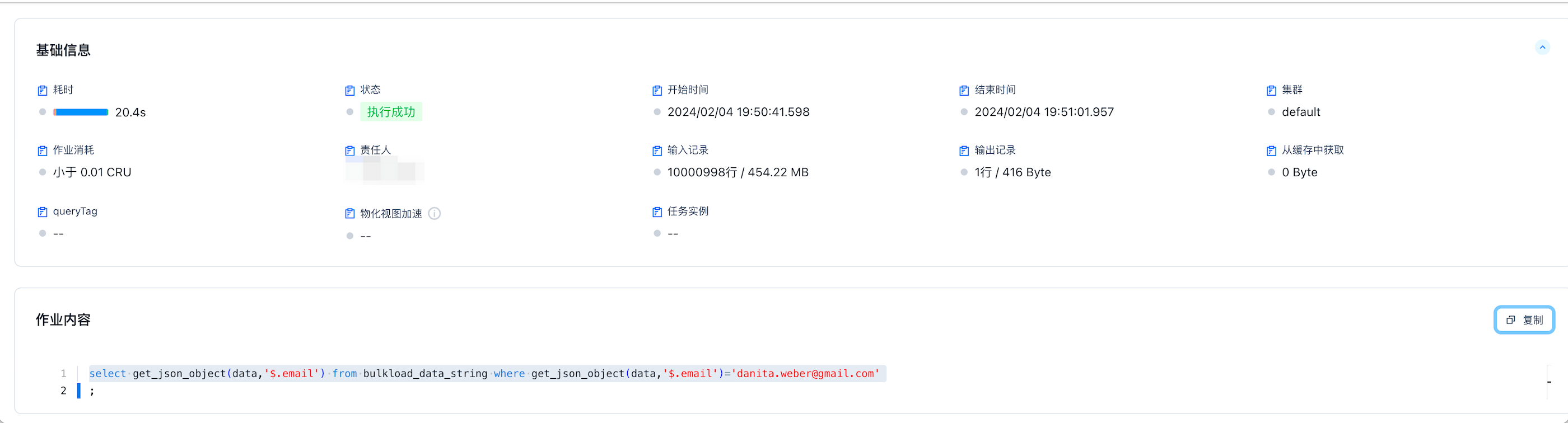
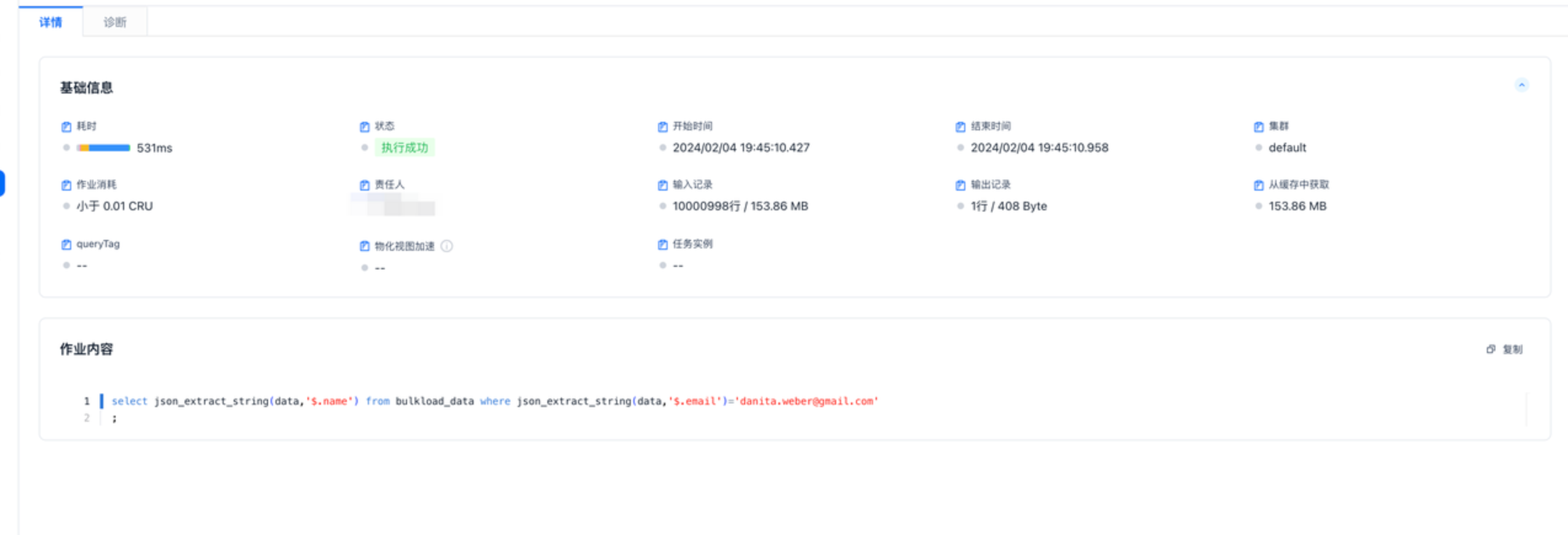
使用 json 存储数据执行时间为 531ms,因为读取时进行列裁剪数据大小也会减少,如下图只需要读取 153MB 数据,string 类型需要全量读取 454MB 数据。
CREATE TABLE bulkload_data(data json);
SELECT json_extract_string(data,'$.name') FROM bulkload_data WHERE json_extract_string(data,'$.email')='danita.weber@gmail.com';
相关指南