创建 LLM 函数分析公司行业
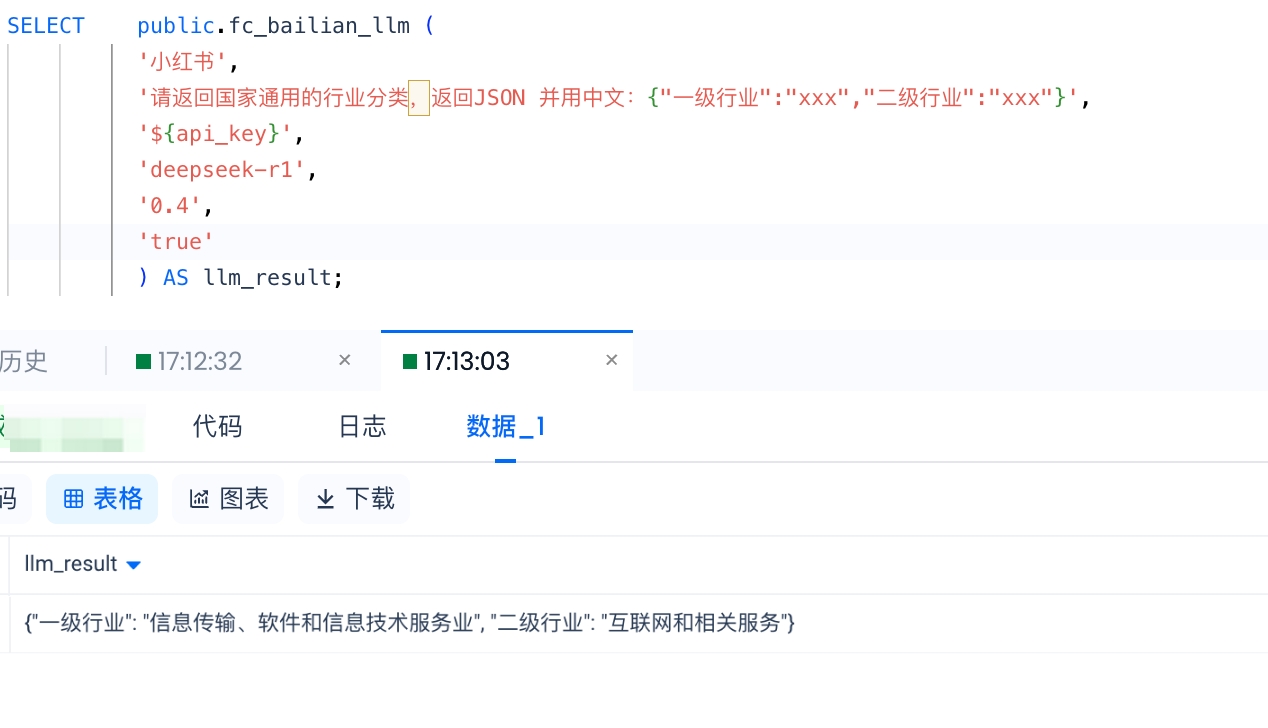
目标:利用大语言模型(LLM)服务,根据 Lakehouse 客户表中的公司名称列,填写国家规范的所属一级行业和二级行业信息。效果如下:
⚠️ 注意:完成本示例,需要你:
- 安装了 Docker (主要是为了保证开发环境与云器运行函数的环境一致)
- 拥有阿里云账号,并开通百炼平台的 API-KEY。参考 阿里云百炼
- 已经创建好 API 连接。参考:创建 API 连接
Step 1:准备开发环境
-
安装 Docker:确保你的本地上安装了 Docker:https://www.docker.com/
-
拉取 Docker 镜像。在本地命令行终端(如 macOS 的 terminal)执行:
[Local]# docker pull quay.io/pypa/manylinux2014_x86_64:2022-10-25-fbea779
-
启动 Docker 容器。该容器基于
manylinux2014_x86_64
manylinux2014_x86_64
镜像,并配置为使用 Python 3.10 环境
[Local]# docker run -it --name cz_func --env PATH="/opt/python/cp310-cp310/bin:$PATH" quay.io/pypa/manylinux2014_x86_64:2022-10-25-fbea779 bash
如果容器已经停止,可以用以下命令启动并登录:
- 启动容器:
# docker start cz_func
- 进入容器:
# docker exec -it cz_func bash
4. 在 /root 目录下创建文件夹 cz_llm
[root@docker root]# cd /root ; mkdir cz_llm
[root@docker cz_llm]# cd cz_llm
[root@docker cz_llm]# touch cz_llm.py
- 将以下程序代码保存到
cz_llm.py
cz_llm.py
文件中:
import os
from cz.udf import annotate
import dashscope
from http import HTTPStatus
import json
import sys
@annotate("*->string")
class llm_call(object):
def evaluate(self, text, prompt, api_key, model_name, temperature=0.7, enable_search=False):
# 设置 API 密钥
dashscope.api_key = api_key
# 构建消息
messages = [
{"role": "system", "content": prompt},
{"role": "user", "content": text}
]
try:
# 调用模型(非流式输出)
response = dashscope.Generation.call(
model=model_name,
messages=messages,
stream=False, # 关闭流式输出
result_format='message',
temperature=temperature,
enable_search=enable_search,
top_p=0.8
)
# 处理响应
if response.status_code == HTTPStatus.OK:
# 非流式输出直接获取完整内容
if hasattr(response.output, 'choices') and len(response.output.choices) > 0:
if hasattr(response.output.choices[0].message, 'content'):
return response.output.choices[0].message.content
else:
return "Error: No content in response"
else:
return "Error: No choices in response"
else:
# 返回错误信息
return f"Error: Request id: {response.request_id}, Status code: {response.status_code}, error code: {response.code}, error
message: {response.message}"
except Exception as e:
# 返回错误信息
return f"Error: {str(e)}"
测试代码:
if __name__ == "__main__":
# 创建实例
llm = llm_call()
# 配置参数
API_KEY = "sk-xxxxxx" # 替换为你的API密钥
MODEL_NAME = "qwen-max" # 或 qwen-plus, qwen-max 等
# 测试示例
test_text = '小红书'
test_prompt = '请返回该公司的国家规范的一级、二级行业,直接输出结果:一级行业":"xxx","二级行业":"xxx",言简意赅'
print("正在调用LLM...")
result = llm.evaluate(test_text, test_prompt, API_KEY, MODEL_NAME, 0, True)
print(f"\n输入文本: {test_text}")
print(f"系统提示: {test_prompt}")
print(f"LLM响应: {result}")
Step2:下载第三方库
程序依赖第三方包:
dashscope
dashscope
需要进行下载(其余为 Python 内置库,如
os
os
、
http
http
、
json
json
、
sys
sys
等,无需下载)。
cz.udf
cz.udf
创建函数时系统会默认添加)
在开发环境中的命令行终端执行:
[root@docker cz_llm]# pwd
/root/cz_llm
[root@docker cz_llm]# pip install dashscope -t .
此时目录结构类似于:

Step3:本地调试
将对以下 3 行做修改,因为当前环境还没有加载
cz.udf
cz.udf
库:
...
2 #from cz.udf import annotate # 注释掉
...
8 #@annotate("*->string") # 注释掉
...
56 API_KEY = "sk-xxxxxx" # 替换为你的API密钥
其中 API_KEY 是阿里云百炼平台的 API-KEY ,需要你注册阿里云账号,登录后在这里获取:阿里云百炼
注释掉上面两行之后,保存退出编辑脚本。执行:
[root@docker cz_llm]# export PYTHONPATH="${_PWD}:${_PWD}/lib"
[root@docker cz_llm]# python cz_llm.py
正在调用LLM...
输入文本: 小红书
系统提示: 请返回该公司的国家规范的一级、二级行业,直接输出结果:一级行业":"xxx","二级行业":"xxx",言简意赅
LLM响应: "一级行业":"互联网","二级行业":"社交媒体"
Step4:打包上传
打包之前,请将上面注释掉的两行,解除注释。
...
2 from cz.udf import annotate # 去掉注释
...
8 @annotate("*->string") # 去掉注释
执行打包命令,确保当前目录为程序目录(本示例为
/root/cz_llm
/root/cz_llm
):
[root@docker cz_llm]# pwd
/root/cz_llm
[root@docker cz_llm]# zip -rq ../cz_llm.zip ./
[root@docker cz_llm]# ls ../
💡 提示:如果你的环境没有 zip 命令,请使用
yum install zip
yum install zip
尝试安装。安装过程中遇到问题,请参考附录“
安装工具时报错”。
你会发现在
/root
/root
目录下有一个
cz_llm.zip
cz_llm.zip
文件,将这个文件拷贝到 Lakehouse USER VOLUME 对象中:
在 Docker 宿主机中执行:
[Local]# docker cp cz_func:/root/cz_llm.zip ~/Downloads
现在
cz_llm.zip
cz_llm.zip
文件在宿主机的用户
Downloads
Downloads
目录下
我们用 Lakehouse JDBC 客户端(请参考 Lakehouse JDBC 客户端),将文件 put 到 Lakehouse USER VOLUME 中:
PUT '/Users/derekmeng/Downloads/transform_company_id.zip' to USER VOLUME;

Step5:创建并使用函数:
本步骤依赖你提前创建好 API connection,创建过程请参考:API Connection
CREATE EXTERNAL FUNCTION public.fc_cz_llm
AS 'cz_llm.llm_call' -- 不带py后缀的主程序文件名.主类名
USING ARCHIVE 'volume:user://~/cz_llm.zip'
connection sg_fc_api_conn -- 需要提前创建 API Connection
WITH PROPERTIES (
'remote.udf.api' = 'python3.mc.v0'
)
COMMENT 'Usage: python get_industry_classification.py <text> <prompt> <api_key> <model_name> [temperature] [enable_search]';
创建过程将持续 1 分钟左右。创建完成后,执行验证函数(注意替换
'${api_key}'
'${api_key}'
):
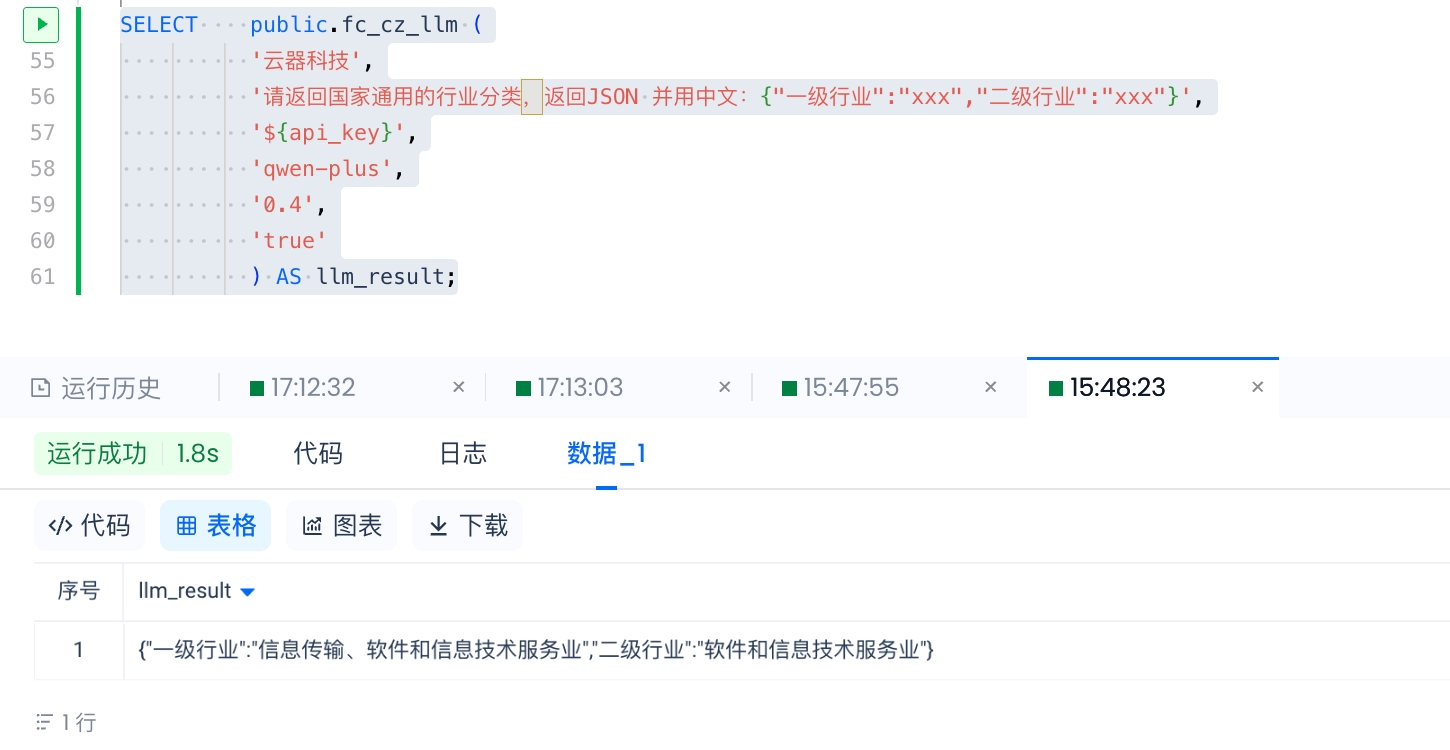
SELECT public.fc_cz_llm (
'云器科技',
'请返回国家通用的行业分类,返回JSON 并用中文:{"一级行业":"xxx","二级行业":"xxx"}',
'${api_key}',
'qwen-plus',
'0.4',
'true'
) AS llm_result;
执行效果如下: